
Home › Marketing, Sales & Customers › Customer Health Score Excel Template
Previewing: Version 1 · Customer Health Dashboard with Scoring Model. Pick another version on the right.
Instant download · No sign-up · No email
Download these free customer health score Excel templates to see which accounts are healthy and which are at risk of leaving. One has a dashboard and a scoring model. One tracks health month by month. One adds a renewal risk matrix and recommended plays.
Choose your version
- File
- .xlsx · 57 KB · 3 sheets
- Works with
- Microsoft Excel (.xlsx)
- Macros
- None · formulas only
- Price
- Free
Score your customers in an Excel spreadsheet
A customer health score turns signals such as product usage, support tickets, survey scores and payments into one number for each account. It tells a customer success team where to act before a renewal is at risk. A spreadsheet is a good place to start: you set the weights and see the effect at once.
These templates give you three approaches. Version 1 is a dashboard with a scorecard and a scoring model. Version 2 tracks health month by month with a heatmap and an account view. Version 3 combines health with days to renewal in a risk matrix with priority accounts.
Best for
- Customer success managers who need a simple health score for their accounts
- Small SaaS and service companies without a customer success platform
- Teams that want to see revenue at risk and upcoming renewals together
Maybe not for
A customer success platform that pulls data from your product and CRM. These are Excel files: you enter the signals, and the scores are calculated from them.
Which version is right for you?
All three are free, formula-driven Excel files with sample data you can replace. They are independent, so you can download more than one.
Version 1
Customer Health Dashboard with Scoring Model
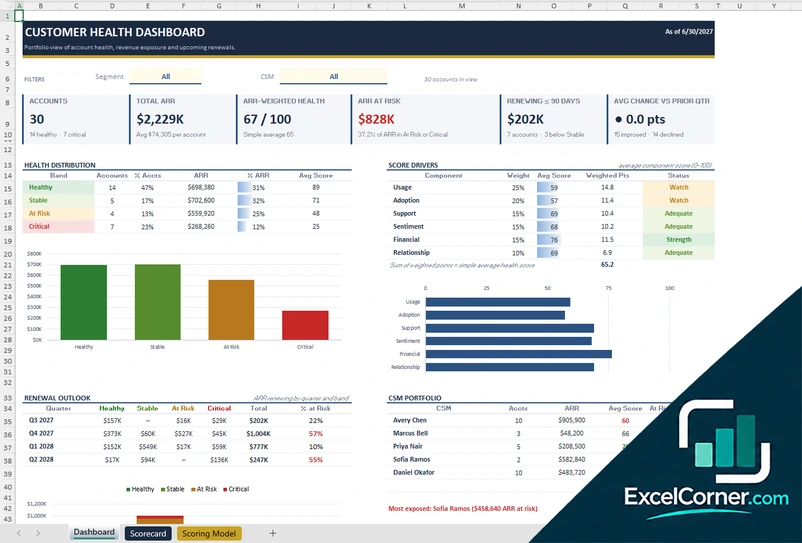
A customer health dashboard with a scorecard for each account, a scoring model with weights, health bands, ARR at risk, renewal outlook and a CSM portfolio.
DashboardScorecardScoring Model
.xlsx · 57 KB
Version 2
Monthly Customer Health Matrix with Account 360
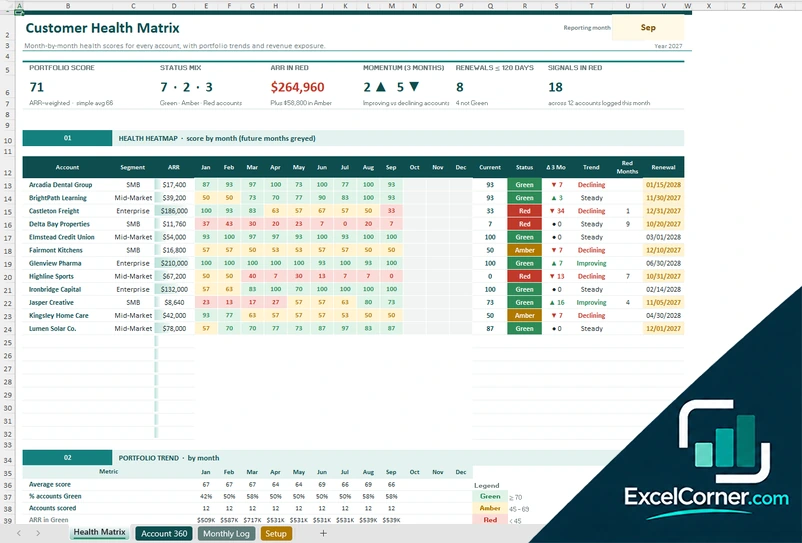
A monthly customer health matrix with a heatmap by account and month, green, amber and red status, momentum, an Account 360 view and a monthly signal log.
Health MatrixAccount 360Monthly LogSetup
.xlsx · 232 KB
Version 3
Customer Health Score with Renewal Risk Matrix
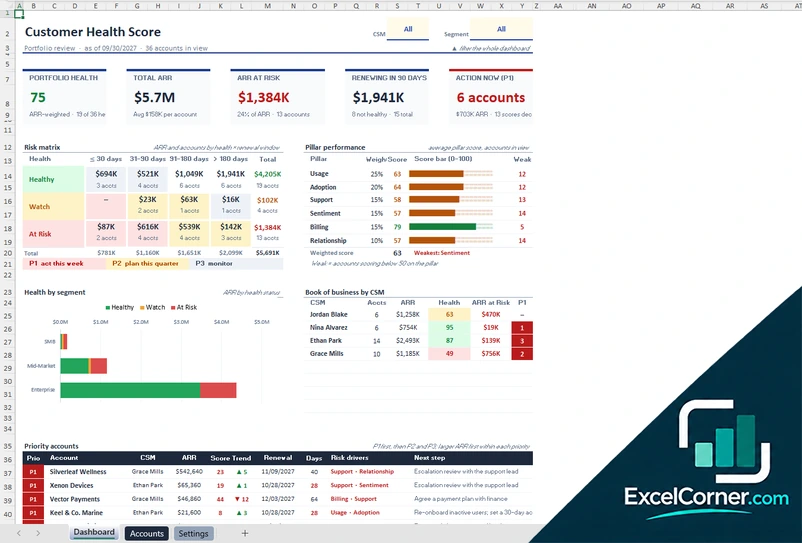
A customer health score with a risk matrix of health against renewal window, pillar scores, health by segment, a book of business by CSM and priority accounts with next steps.
DashboardAccountsSettings
.xlsx · 96 KB
What is inside the customer health score Excel templates
Version 1: Customer Health Dashboard with Scoring Model
The Scorecard sheet has one row per account with its segment, CSM, plan, billing, amount per charge, renewal date and ARR, and the product and support signals. The Scoring Model sheet holds the weights, scoring ranges and rules, such as the points taken off for each open ticket.
The Dashboard filters by segment and CSM and shows the number of accounts, total ARR, ARR-weighted health, ARR at risk and renewals within 90 days. It has a health distribution, score drivers, a renewal outlook and a CSM portfolio.
Version 2: Monthly Customer Health Matrix with Account 360
The Setup sheet holds the accounts, the scoring rubric and the thresholds for green, amber and red. On the Monthly Log you enter one row per account per month: weekly active users, key feature usage, seat utilization, open tickets and survey score.
The Health Matrix shows the portfolio score, status mix, ARR in red and momentum, with a heatmap by month. Account 360 lets you pick an account and a month to see its profile, health, commercial data and signals.
Version 3: Customer Health Score with Renewal Risk Matrix
The Accounts sheet has one row per customer with the CSM, segment, plan, billing, amount, renewal date, licensed seats and the health signals. The Settings sheet holds the scoring rules, the weights of the pillars and recommended plays for each weakest pillar.
The Dashboard shows portfolio health, total ARR, ARR at risk and renewals in 90 days, a risk matrix of health by renewal window, pillar performance, health by segment, a book of business by CSM and priority accounts with risk drivers and next steps.
How to use a customer health score template in Excel
- Download
Pick the version that you want and open it in Excel. Each file has sample accounts. - Set the scoring
Review the weights and the thresholds for each signal and change them to fit your product. - Enter the accounts
Add each customer with its contract data, such as the plan, the renewal date and the revenue. - Enter the signals
Type the usage, support, survey and other signals for each account, or for each month. - Act on the results
Look at the accounts that are at risk or renewing soon and start with the biggest revenue.
Replace the sample accounts with your own. The scores, the bands and the charts update on their own.
Which customer health score template do you need?
| Dashboard with Scoring Model | Monthly Health Matrix | Renewal Risk Matrix | |
|---|---|---|---|
| View | A portfolio dashboard with a scorecard | Health by account and month | Health against days to renewal |
| Best for | A first health score for all accounts | Trends and one account in detail | Prioritizing accounts before renewal |
| You get | Health bands, ARR at risk, score drivers, renewals | Heatmap, status mix, momentum, account 360 | Risk matrix, pillar scores, priority accounts and plays |
| Sheets | 3 | 4 | 3 |
| Charts | Yes | Yes | Yes |
They are separate files, so you can use more than one.
Tips for a health score that works
- Start with a few signals that you trust, such as usage, support, sentiment and payments.
- Give the most weight to the signals that best predict churn in your business.
- Check the score against accounts that you know, and adjust the weights.
- Update the signals on a fixed schedule, for example monthly.
- Use the score to decide what to do, not only to report.
Frequently asked questions
Are these customer health score Excel templates free?
Yes. All three versions are free to download as .xlsx files. You do not need an account or an email address.
Which version should I choose?
Choose the Dashboard with Scoring Model (Version 1) for a portfolio view with a scorecard. Choose the Monthly Health Matrix (Version 2) to follow health by month and see one account in detail. Choose the Renewal Risk Matrix (Version 3) to combine health with renewal dates and plan next steps.
What is a customer health score?
It is a number, usually from 0 to 100, that combines signals such as product usage, support tickets, survey scores and payment status. A high score means a healthy account. A low score means a risk of churn.
How do I calculate a customer health score in Excel?
Convert each signal to a score from 0 to 100, give each a weight, and add up the weighted scores. Then assign a band such as healthy, watch or at risk. The templates do this with a scoring model that you can edit.
Which signals should I use?
Common signals are product usage, adoption of key features, support tickets, survey or NPS scores, and billing health. The templates use pillars such as usage, adoption, support, sentiment, financial and relationship, and you can change them.
More free marketing, sales and customer templates
These templates use made-up sample data and example scoring rules. Adjust the weights and the thresholds to your own product and customers before you rely on the scores. Excel is a trademark of Microsoft Corporation; Excel Corner is not affiliated with Microsoft.