
Home › Marketing, Sales & Customers › Product Catalog Template Excel
Previewing: Version 1 · Product Catalog with Dashboard and Stock Health. Pick another version on the right.
Instant download · No sign-up · No email
Download these free product catalog templates in Excel. One keeps up to 200 products with margins, stock and a dashboard. One is a catalog viewer with a quote and payment calculator. One has tier prices for retail, wholesale and distributor and a category summary.
Choose your version
- File
- .xlsx · 46 KB · 3 sheets
- Works with
- Microsoft Excel (.xlsx)
- Macros
- None · formulas only
- Price
- Free
Build a product catalog in an Excel spreadsheet
A product catalog lists everything you sell, with the code, the description, the price and the stock. In Excel you keep one master list and let the sheets work for you: the margin of each product, the stock alerts, the value of the inventory and the totals by category are calculated, so the catalog is always up to date.
These three templates cover different needs. Version 1 is a catalog with a dashboard, stock health and an order calculator. Version 2 is a catalog viewer where you pick a product and get a quote with a payment plan. Version 3 is a catalog with tier prices and a summary by category.
Best for
- Small businesses and shops that keep their products in a spreadsheet
- Sales people who need to show a product and quote it quickly
- Wholesalers that sell at retail, wholesale and distributor prices
Maybe not for
An e-commerce platform or a PIM that holds photos, stock and orders online. These are Excel files: you type your products, and the margins, the alerts and the totals are calculated from them.
Which version is right for you?
All three are free, formula-driven Excel files with sample data you can replace. They are independent, so you can download more than one.
Version 1
Product Catalog with Dashboard and Stock Health
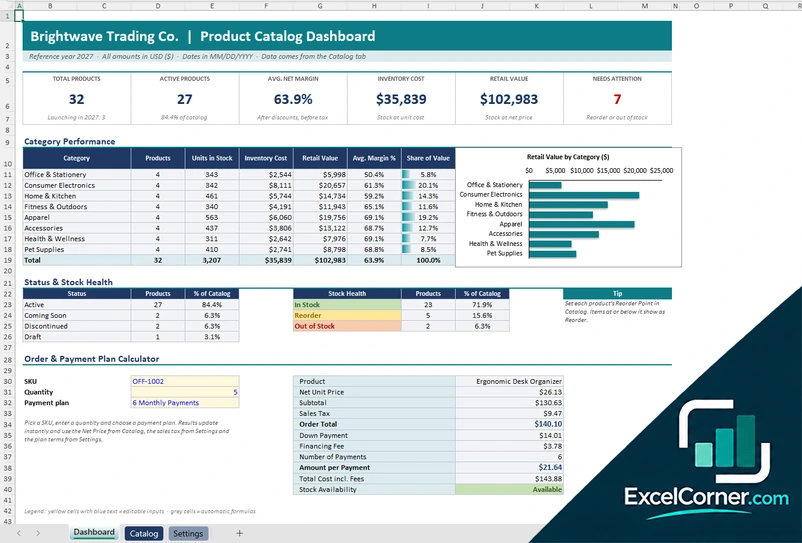
A product catalog with a dashboard, a catalog of up to 200 products with pricing, margin and inventory, an order and payment plan calculator and a settings sheet.
DashboardCatalogSettings
.xlsx · 46 KB
Version 2
Catalog Viewer with Quote and Payment Builder
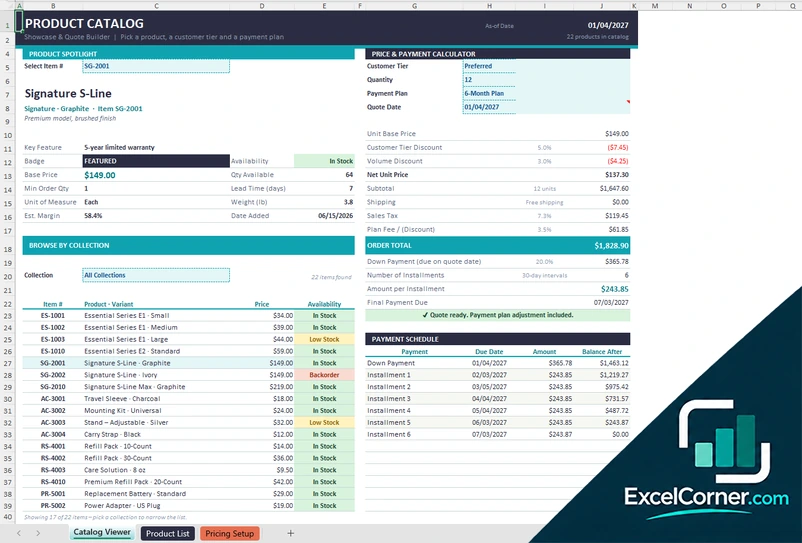
A product catalog viewer with a product spotlight, a browse-by-collection list, a quote and payment calculator, a master product list and a pricing setup sheet.
Catalog ViewerProduct ListPricing Setup
.xlsx · 36 KB
Version 3
Product Catalog with Tier Prices and Category Summary
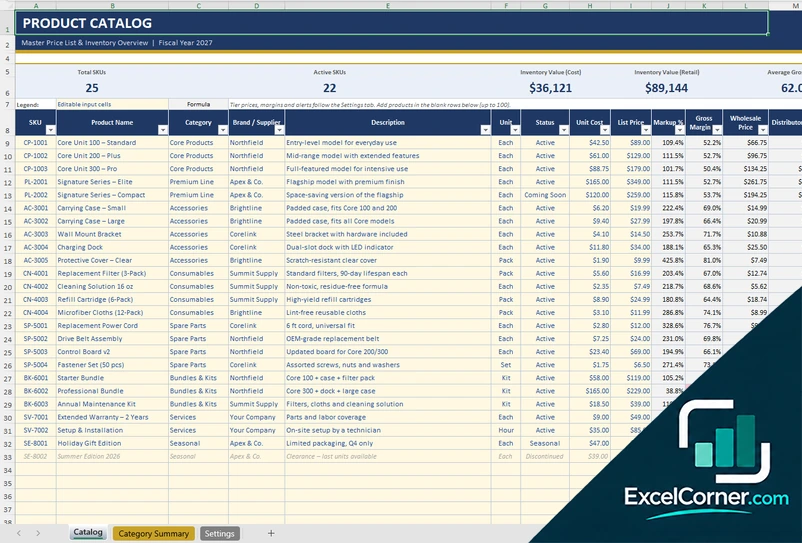
A product catalog of up to 100 products with tier prices, markup and margin, stock alerts, a category summary with a chart and a settings sheet for tiers and policies.
CatalogCategory SummarySettings
.xlsx · 34 KB
What is inside the product catalog templates
Version 1: Product Catalog with Dashboard and Stock Health
The Catalog sheet holds up to 200 products: the product information, the pricing and margin, the inventory with a reorder point, and the payment plan. You type in the yellow cells and the grey columns calculate. The Settings sheet has the payment plans, categories, suppliers and statuses.
The Dashboard shows the total and active products, the average net margin, the inventory cost, the retail value and the products that need attention, with a performance table and chart by category, stock health and an order and payment plan calculator.
Version 2: Catalog Viewer with Quote and Payment Builder
The Product List sheet is the master database of up to 100 products with details, pricing, stock and logistics. The Catalog Viewer shows one product as a spotlight, with its badge, availability, margin and lead time, and a list you can narrow by collection.
The price and payment calculator takes the customer tier, the quantity and a payment plan, applies the discounts and the tax and shows the order total and the payment schedule. The Pricing Setup sheet holds the tiers, plans and volume breaks.
Version 3: Product Catalog with Tier Prices and Category Summary
The Catalog sheet lists up to 100 products with the SKU, the name, the category, the brand or supplier, the unit and the status. It calculates the markup, the gross margin and the list, wholesale and distributor prices from the cost and the tier rules, and flags alerts.
The Category Summary sheet gives a snapshot by category with the stock status breakdown and a chart. The Settings sheet holds the pricing tiers and the pricing policies.
How to use a product catalog template in Excel
- Download
Pick the version that fits your business and open it in Excel. Each file has sample products. - Set up the lists
Enter your categories, suppliers, price tiers and payment plans on the settings sheet. - Add your products
Add one row per product with a code, a name, a category, the cost and the price. - Set the stock rules
Enter the stock on hand and a reorder point, so the catalog shows what needs attention. - Use it
Read the dashboard, filter the catalog, or pick a product and quote it.
Replace the sample products with your own. The margins, the alerts and the totals update on their own.
Which product catalog template do you need?
| Catalog with Dashboard | Catalog Viewer with Quote Builder | Catalog with Tier Prices | |
|---|---|---|---|
| Holds | Up to 200 products | Up to 100 products | Up to 100 products |
| Best for | Margins, stock and inventory value | Showing and quoting a product | Retail, wholesale and distributor prices |
| You get | Dashboard, stock health, payment calculator | Spotlight, collections, quote and plan | Tier prices, margins, category summary |
| Sheets | 3 | 3 | 3 |
| Charts | 1 | No | 1 |
They are separate files, so you can use more than one.
Tips for a product catalog
- Give every product a unique code and keep it the same everywhere.
- Use the same categories on every sheet, so the totals add up.
- Keep the cost next to the price, so you always see the margin.
- Set a reorder point for each product.
- Mark discontinued items instead of deleting them, to keep your history.
Frequently asked questions
Are these product catalog templates free?
Yes. All three versions are free to download as .xlsx files. You do not need an account or an email address.
Which version should I choose?
Choose the Catalog with Dashboard (Version 1) for margins and stock. Choose the Catalog Viewer (Version 2) to show a product and build a quote. Choose the Catalog with Tier Prices (Version 3) to sell at retail, wholesale and distributor prices.
What should a product catalog include?
A product code, a name and a description, the category, the unit, the cost and the price, and the stock status. Many catalogs also hold the supplier, the margin and a reorder point. The templates have columns for all of them.
How do I make a product catalog in Excel?
Make a table with one row per product and a column for the code, the name, the category, the cost and the price. Add a margin formula and a stock column. Use a filter to browse it. The templates already do this, with alerts and totals.
Can I add pictures to the catalog?
These templates do not include pictures. You can insert an image in a cell or add a column with a link to each picture. For a catalog with many pictures, a printed or online catalog tool works better.
More free pricing and sales templates
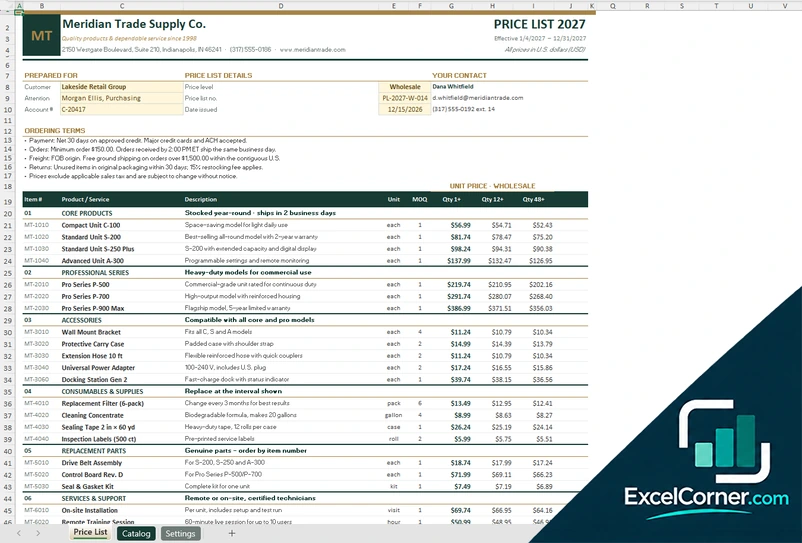
These templates use made-up sample companies, products and prices. Check the prices, the taxes, the discounts and the terms against your own rules before you share them with a customer. Excel is a trademark of Microsoft Corporation; Excel Corner is not affiliated with Microsoft.