
Home › Operations, Inventory & Logistics › SKU Generator Excel Template
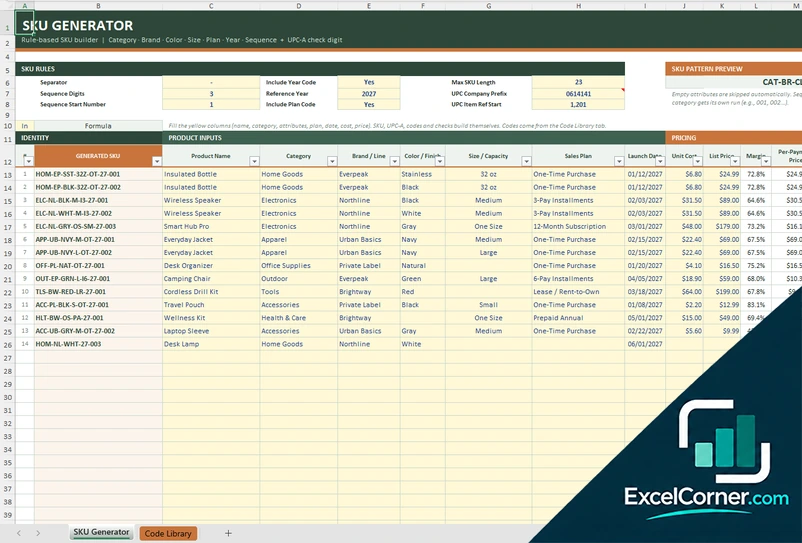
Previewing: Version 1 · Rule-Based SKU Generator with UPC Check Digit. Pick another version on the right.
Instant download · No sign-up · No email
Download these free SKU generator templates in Excel. One builds SKUs from rules for category, brand, color, size and year, with a UPC check digit. One creates every variant of a product from up to three option lists and decodes any SKU. One is a SKU register with automatic sequencing and duplicate control.
Choose your version
- File
- .xlsx · 53 KB · 2 sheets
- Works with
- Microsoft Excel (.xlsx)
- Macros
- None · formulas only
- Price
- Free
Generate SKUs in an Excel spreadsheet
A SKU is a short code that identifies a product and its variant, such as the size or the color. A good SKU follows rules, so that anyone can read it and nobody uses the same code twice. In Excel you set the rules and the code library once, and the SKU of each product is built for you, with a sequence number.
These three templates work in different ways. Version 1 builds a SKU from the category, the brand, the color, the size and the year, and adds a UPC-A check digit. Version 2 creates every variant of a parent product and can decode a SKU back. Version 3 is a register of products with duplicate control.
Best for
- Online sellers who need consistent codes for many products and variants
- Warehouses and shops that want to read a SKU and know the product
- Anyone who prepares a product list for a store or an inventory system
Maybe not for
An inventory or ERP system that assigns codes by itself. These are Excel files: you type the product attributes and the codes are built from your rules.
Which version is right for you?
All three are free, formula-driven Excel files with sample data you can replace. They are independent, so you can download more than one.
Version 1
Rule-Based SKU Generator with UPC Check Digit
A rule-based SKU generator with a code library, a sequence for each category, a UPC-A check digit, price and margin checks, and sales plans for each product.
SKU GeneratorCode Library
.xlsx · 53 KB
Version 2
Variant Matrix with SKU Decoder
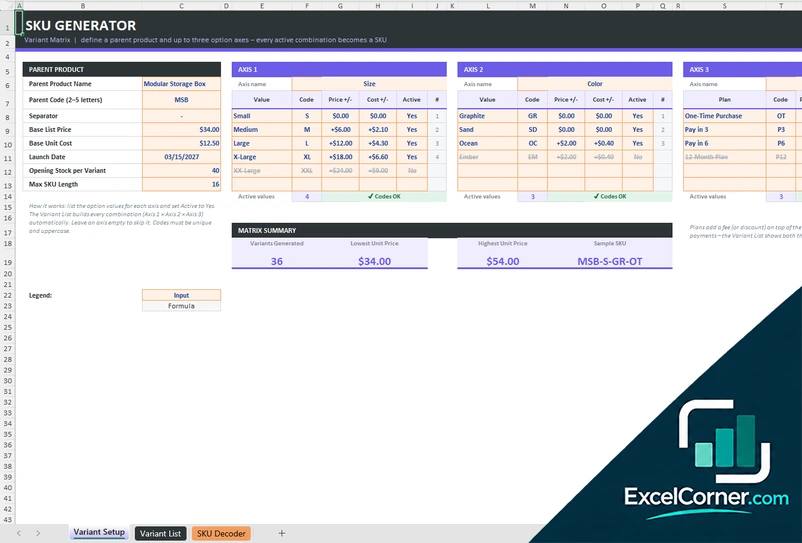
A SKU generator that builds a SKU for every active combination of options, with price and margin, a purchase plan and stock, and a decoder that translates any SKU back.
Variant SetupVariant ListSKU Decoder
.xlsx · 48 KB
Version 3
SKU Register with Duplicate Control and Variant Builder
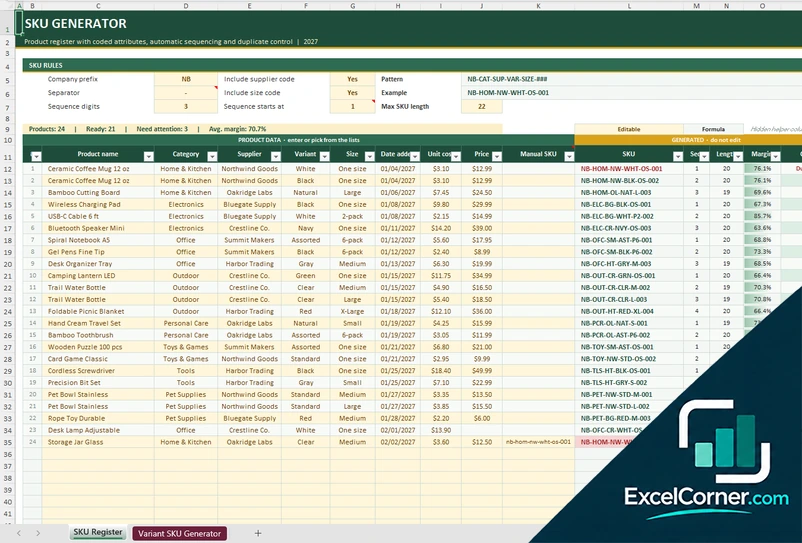
A SKU register with a company prefix, supplier and size codes, automatic sequencing, manual overrides, duplicate control, and a variant builder for two option lists.
SKU RegisterVariant SKU Generator
.xlsx · 35 KB
What is inside the SKU generator templates
Version 1: Rule-Based SKU Generator with UPC Check Digit
On the SKU Generator sheet you set the SKU rules: the separator, the number of digits of the sequence, the year code and the UPC company prefix. You enter each product with its category, brand, color, size, sales plan, launch date, cost and price.
It builds the SKU, with a sequence that restarts for each category, and the UPC-A check digit. It also shows the price, the margin and the checks. The Code Library holds one short code for each category, brand, color, size and plan.
Version 2: Variant Matrix with SKU Decoder
On the Variant Setup sheet you enter a parent product with a code, a base price and a cost, and up to three option axes, such as size, color and purchase plan. Each value has a code, a price change and a cost change, and you switch it on or off.
The Variant List builds a priced and checked SKU for every active combination, with the stock. The SKU Decoder splits any SKU by the separator and translates each segment back to its meaning.
Version 3: SKU Register with Duplicate Control and Variant Builder
The SKU Register sheet has the SKU rules, with a company prefix, the separator, the sequence digits and whether the SKU includes the supplier and the size. Each product has its attributes, the cost and the price, and a manual SKU if you need one.
It builds the SKU with an automatic sequence, checks the length and flags duplicates, and shows the margin. The Variant SKU Generator takes a parent product and two option lists and lists every variant SKU, ready to copy.
How to use a SKU generator in Excel
- Download
Pick the version that fits your catalog and open it in Excel. Each file has sample products. - Set the rules
Choose the separator, the number of digits of the sequence and which parts the SKU has. - Fill the code library
Give each category, brand, color and size a short code. - Enter the products
Add each product with its attributes, or define a parent product and its options. - Copy the SKUs
Check the flags for duplicates and length, then copy the SKUs to your store or your inventory.
Replace the sample products with your own. The SKUs, the checks and the variant list update on their own.
Which SKU generator do you need?
| Rule-Based SKU Generator | Variant Matrix with Decoder | SKU Register with Variants | |
|---|---|---|---|
| You enter | Product attributes and a code library | A parent product and up to three option lists | Products with coded attributes |
| Best for | Many different products | One product in many variants | Keeping a register without duplicates |
| You get | SKU, sequence, UPC check digit, price and margin | Every variant priced, a SKU decoder | SKU, duplicate control, variant builder |
| Sheets | 2 | 3 | 2 |
| Charts | No | No | No |
They are separate files, so you can use more than one.
Tips for good SKUs
- Keep SKUs short, readable and in capital letters.
- Do not use spaces or special characters. A dash is enough as a separator.
- Never reuse a SKU, even for a discontinued product.
- Do not put the price in the SKU, because prices change.
- Document the meaning of each code, so new staff can read them.
Frequently asked questions
Are these SKU generator templates free?
Yes. All three versions are free to download as .xlsx files. You do not need an account or an email address.
Which version should I choose?
Choose the Rule-Based SKU Generator (Version 1) for many different products. Choose the Variant Matrix (Version 2) for one product with many options. Choose the SKU Register (Version 3) to keep a product register with duplicate control.
What is a SKU?
A SKU, or stock keeping unit, is a code that identifies one product variant in your catalog and your inventory. It is made for internal use, and it is different from a barcode such as the UPC, which is shared with other sellers.
How do I create SKUs in Excel?
Decide the parts, for example category, brand, color and size, give each value a short code, and join them with a separator and a sequence number. The templates do this with a code library, so the SKU is built when you type the attributes.
What is a UPC check digit?
It is the last digit of a UPC-A barcode, calculated from the other 11 digits, so that a scanner can detect a typing error. Version 1 calculates it from your company prefix and an item number.
More free inventory and logistics templates
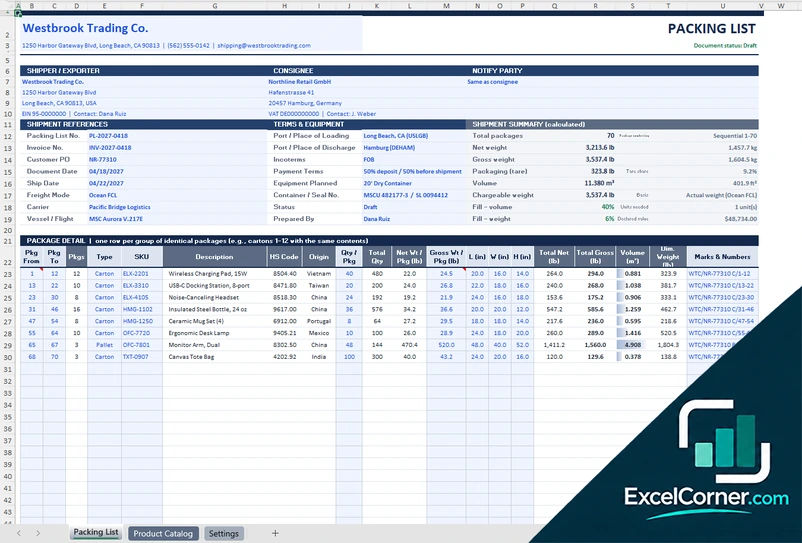
These templates use made-up sample products and codes. Check the codes against your own system, and check any barcode with your scanner before you print labels. Excel is a trademark of Microsoft Corporation; Excel Corner is not affiliated with Microsoft.