
Home › Operations, Inventory & Logistics › CMR Template Excel
Previewing: Version 1 · CMR Note with Document Checks. Pick another version on the right.
Instant download · No sign-up · No email
Download these free CMR templates for Excel to prepare consignment notes for road transport and to keep track of them. One version is a CMR note with an address book and automatic document checks, one is a dashboard with a register of all your CMR notes, deliveries and freight invoices, and one is a detailed CMR note with load planning in loading meters and a pricing guide.
Choose your version
- File
- .xlsx · 18 KB · 2 sheets
- Works with
- Microsoft Excel (.xlsx)
- Macros
- None · formulas only
- Price
- Free
Prepare a CMR consignment note in an Excel spreadsheet
A CMR is the consignment note for the international carriage of goods by road. It names the sender, the consignee and the carrier, describes the goods, records where and when they were taken over and where they will be delivered, and carries the instructions, the special agreements and the signatures of the parties. It is based on the Convention on the Contract for the International Carriage of Goods by Road, and the boxes of the form are numbered. A spreadsheet is a handy way to fill it in without starting from a blank form each time, because the addresses, the carriers and the totals can be reused and calculated.
These Excel templates give you three ways to work with CMR notes. The first is a one-page CMR note in the familiar numbered layout, with an address book for senders, consignees and carriers, a list of goods with weight and volume, a payment section and a panel that checks the document before you issue it. The second is a CMR dashboard with a register: you log every CMR note with its dates, its carrier and its freight, and the dashboard shows the transit time, the clean deliveries, the signed proofs of delivery still pending and the freight billed and overdue. The third is a detailed CMR note with a reference block, customs and ADR notes, loading meters and stacking, and a setup sheet with vehicle types and pricing rules.
Best for
- Freight forwarders, hauliers and transport coordinators who issue CMR notes
- Shippers and logistics teams that send goods by road across borders
- Small transport companies that want a simple register of consignment notes, deliveries and freight invoices
Maybe not for
A transport management system or an electronic CMR (e-CMR) platform. These templates are Excel files that you fill in and print or save as a PDF. They do not replace the legal requirements of your contract, so check the requirements that apply to your shipments.
Which version is right for you?
All three are free, formula-driven Excel files with sample data you can replace. They are independent, so you can download more than one.
Version 1
CMR Note with Document Checks
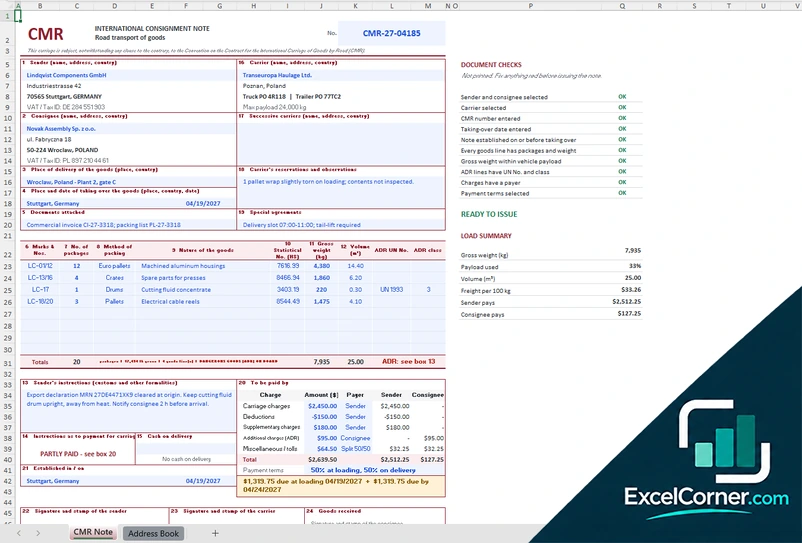
A one-page CMR consignment note with sender, consignee and carrier from an address book, a list of goods, charges by payer and an automatic check that tells you when it is ready to issue.
CMR NoteAddress Book
.xlsx · 18 KB
Version 2
CMR Dashboard and Register
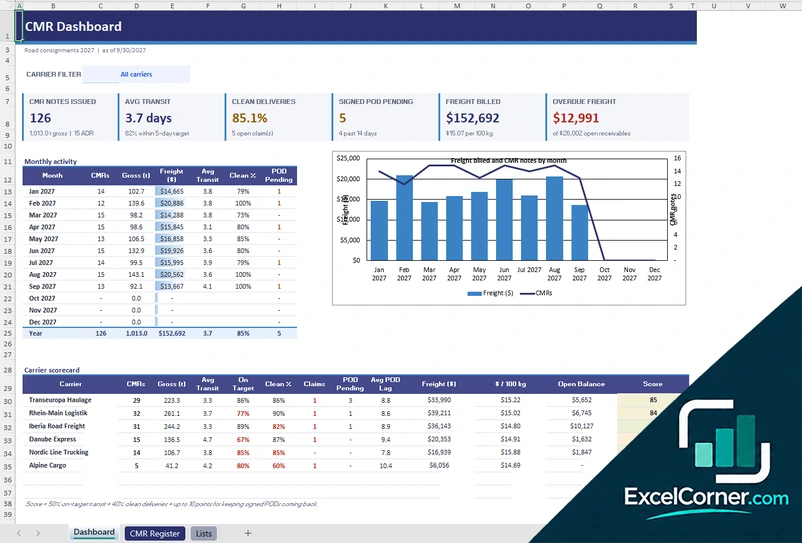
Keep a register of your CMR notes and get a dashboard of notes issued, transit days, clean deliveries, pending proofs of delivery, freight billed, a carrier scorecard and receivables aging.
DashboardCMR RegisterLists
.xlsx · 108 KB
Version 3
Detailed CMR Note with Load Planning
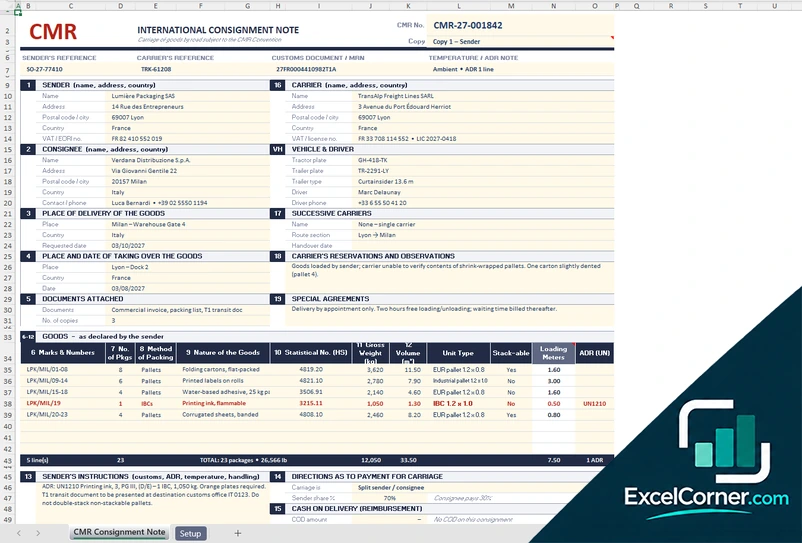
A CMR note with a reference block, vehicle and driver, a goods table with unit types, stacking and loading meters, and a setup sheet with vehicle types, pallet sizes and pricing rules.
CMR Consignment NoteSetup
.xlsx · 25 KB
What is inside the CMR Excel templates
Version 1: CMR Note with Document Checks
The CMR Note sheet reproduces the numbered boxes of the CMR: the sender, the consignee, the place of delivery, the place and date of taking over, the documents attached, the goods (marks and numbers, number of packages, method of packing, nature of the goods, statistical number, gross weight, volume and dangerous goods UN number and class), the instructions of the sender, the instructions for the payment of the carriage, cash on delivery, the carrier, successive carriers, reservations and observations, special agreements, the charges to be paid and the signature boxes. You choose the sender, the consignee and the carrier from lists and the addresses fill in. A panel of document checks tells you whether a sender and a consignee are selected, the CMR number and the taking-over date are entered, every goods line has packages and weight, the gross weight is within the payload of the vehicle, dangerous goods lines have a UN number and a class, the charges have a payer and payment terms are selected, and it shows ready to issue when all are met. A load summary gives the gross weight, the payload used, the volume, the freight per 100 kg and the amount that the sender and the consignee pay. The Address Book holds the senders and consignees, the carriers with their trucks, trailers and maximum payload, the payment terms for the carriage, the packing types and the payer options.
Version 2: CMR Dashboard and Register
The CMR Register holds up to 600 CMR notes. For each one you enter the CMR number, the date issued, the sender, the consignee, the origin and the destination, the carrier, the truck plate, the gross weight, the dates of taking over and delivery, the result of the delivery (box 24 of the CMR), whether the signed proof of delivery is back, the freight, who pays, the payment terms and the payment. The sheet calculates the transit days, the lag of the proof of delivery, the date the invoice is due, the balance, the aging and the freight per 100 kg. The Dashboard has a carrier filter and shows the CMR notes issued, the average transit time, the percentage of clean deliveries, the signed proofs of delivery still pending, the freight billed and the overdue freight. A monthly activity table with a chart follows the notes, the gross weight, the freight, the transit, the clean deliveries and the pending proofs, a carrier scorecard compares the carriers on the notes, the weight, the on-target rate, the claims, the proof of delivery lag, the cost per 100 kg, the open balance and a score, and a freight receivables aging and a table of destinations complete the sheet. The Lists sheet holds the settings, the payment terms, the carriers, the destination countries and the delivery results.
Version 3: Detailed CMR Note with Load Planning
The CMR Consignment Note sheet has a header with the CMR number, a copy label such as copy 1 for the sender, the references of the sender and the carrier, the customs document or MRN and a temperature or ADR note. It then follows the numbered boxes for the sender, the consignee, the place of delivery, the place and date of taking over, the documents attached, the carrier, the vehicle and the driver with the tractor and trailer plates, the successive carriers, the reservations and observations and the special agreements. The goods table lists the marks and numbers, the number of packages, the method of packing, the nature of the goods, the statistical number, the gross weight, the volume, the unit type, whether the unit is stackable, the loading meters and the dangerous goods UN number, with totals. Below it are the instructions of the sender, the directions as to the payment for the carriage, the cash on delivery and the charges. The Setup sheet is a guide with the vehicle and trailer types and their length in loading meters, payload and volume, the pallet and unit footprints, the pricing and chargeable-weight rules, the payment plans and the lists, for example of the methods of packing and the payers of the carriage.
How to use a CMR template in Excel
- Download
Pick the version you want and open it in Excel. The files have sample consignments for a made-up transport company, so you can see how each sheet works. - Fill in the address book
On the address book or lists sheet, enter your senders and consignees, your carriers with their truck and trailer plates, your payment terms and your packing types. - Complete the note
Select the sender, the consignee and the carrier, enter the place and date of taking over, the place of delivery and the goods with their packages, weight and volume. - Check the document
Read the document checks or the totals. They tell you what is missing, such as a weight above the payload or a dangerous goods line without a UN number. - Print or register it
Print the CMR note or save it as a PDF, and, in the register version, log the delivery, the signed proof of delivery and the freight invoice.
Replace the sample content with your own. The totals, the document checks, the transit times and the charts update on their own.
Which CMR template do you need?
| CMR Note with Document Checks | CMR Dashboard and Register | Detailed CMR Note with Load Planning | |
|---|---|---|---|
| For | Issuing one CMR note quickly | Tracking all CMR notes and freight | A detailed note with loading meters |
| Best for | Hauliers and forwarders | Transport managers and accounts | Planners of full and part loads |
| Main outputs | Numbered CMR note, document checks, load summary, charges by payer | CMR notes issued, transit time, clean deliveries, POD pending, freight billed and overdue, aging | Note with reference block, loading meters, stacking, ADR line, pricing rules |
| Sheets | 2 | 3 | 2 |
| Charts | No | Yes | No |
They are separate files, so you can use more than one.
Tips for CMR notes
- Fill in every numbered box that applies to the shipment, and leave a box empty only when it does not apply.
- Check the names and the addresses of the sender, the consignee and the carrier against the transport order.
- Describe the goods, the number of packages and the weight as exactly as you can, because the carrier relies on them.
- Mark dangerous goods with the UN number and the class, and check them against the ADR rules.
- Write the reservations of the carrier on the note when the goods or the packing look damaged at pick-up.
- Agree the payer of the charges and the payment terms before the goods leave, and write them in the note.
- Keep the signed copy of the proof of delivery, and chase it when it is late, because freight is often invoiced against it.
Frequently asked questions
Are these CMR templates for Excel free?
Yes. All three versions are free to download as .xlsx files. You do not need an account or an email address.
Which version should I choose?
Choose the CMR Note with Document Checks (Version 1) if you want to fill in a CMR quickly with an address book and automatic checks. Choose the CMR Dashboard and Register (Version 2) to keep a register of all your CMR notes with deliveries, proofs of delivery and freight. Choose the Detailed CMR Note with Load Planning (Version 3) if you plan loads in loading meters and need a reference block, customs and ADR information.
What is a CMR?
A CMR, or CMR consignment note, is the transport document for the international carriage of goods by road under the CMR Convention. It serves as proof of the contract of carriage, of the receipt of the goods by the carrier and of the conditions of the transport.
What information goes on a CMR note?
A CMR note includes the sender, the consignee, the carrier, the place of delivery, the place and date of taking over the goods, the documents attached, the marks and numbers, the number and the packing of the packages, the nature of the goods, the gross weight and the volume, dangerous goods details, the instructions of the sender, the payment of the carriage, the special agreements and the signatures. The templates follow the numbered boxes.
How many copies of a CMR are there?
The CMR is normally issued in three original copies, one for the sender, one that travels with the goods and one for the carrier. Version 3 labels the copy, for example copy 1 for the sender.
Can I use these templates as an official CMR form?
The templates follow the layout of the numbered boxes and you can print them, but the requirements for a valid consignment note can vary with the contract and the countries involved. Check your own requirements, and use them as a working template.
What is a loading meter?
A loading meter, or LDM, is a unit that measures the length of a trailer floor that your goods use, with one meter for a width of about 2.4 meters. It is used to price and plan part loads. Version 3 has a loading meters column in the goods table and lists vehicle types by their length in loading meters.
Does the template work in Google Sheets?
The files are made for Microsoft Excel and use standard formulas with no macros. You can upload them to Google Drive and open them with Google Sheets, but some formatting or charts may look different.
Is my information stored online?
No. The templates are plain Excel files, so the names, addresses, dates and amounts you type stay in your own file on your own computer.
More free logistics templates
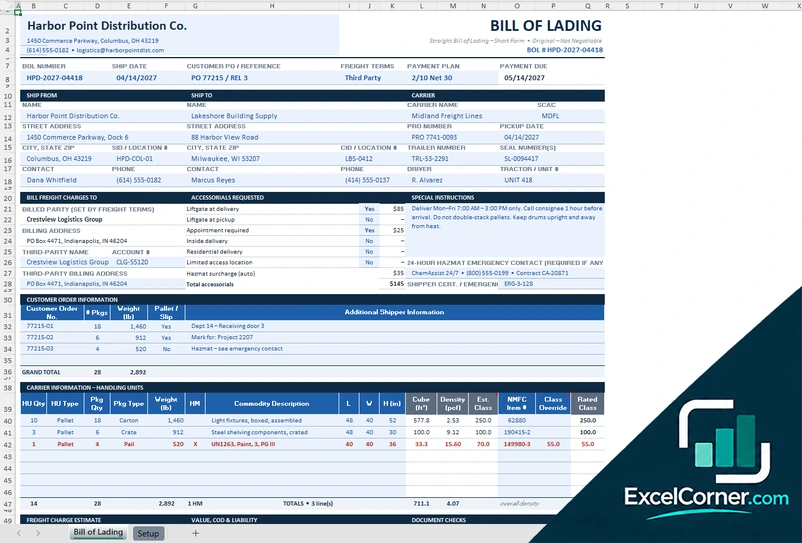
These templates are document and tracking tools with made-up sample data. They are not legal documents or legal advice. Check your carrier agreements, local law and customs rules, because the terms of a bill of lading or a CMR note depend on the contract and the countries involved. Excel is a trademark of Microsoft Corporation; Excel Corner is not affiliated with Microsoft.