
Home › Operations, Inventory & Logistics › Bill of Lading Template Excel
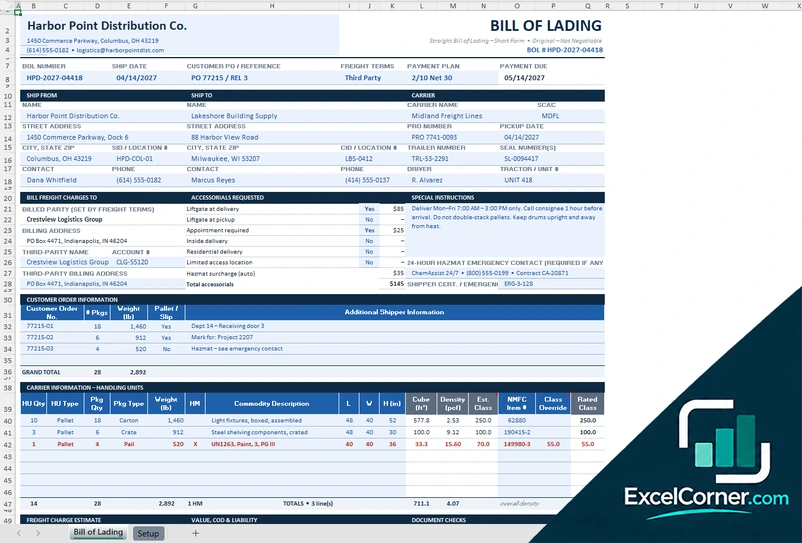
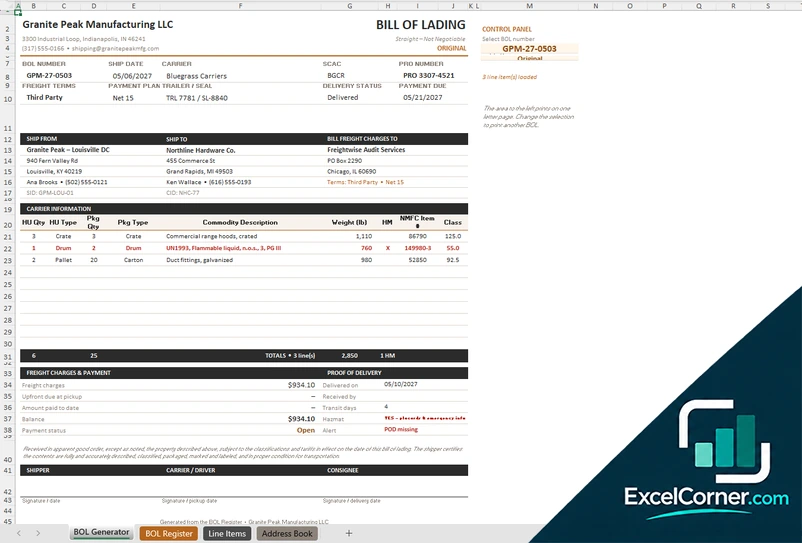
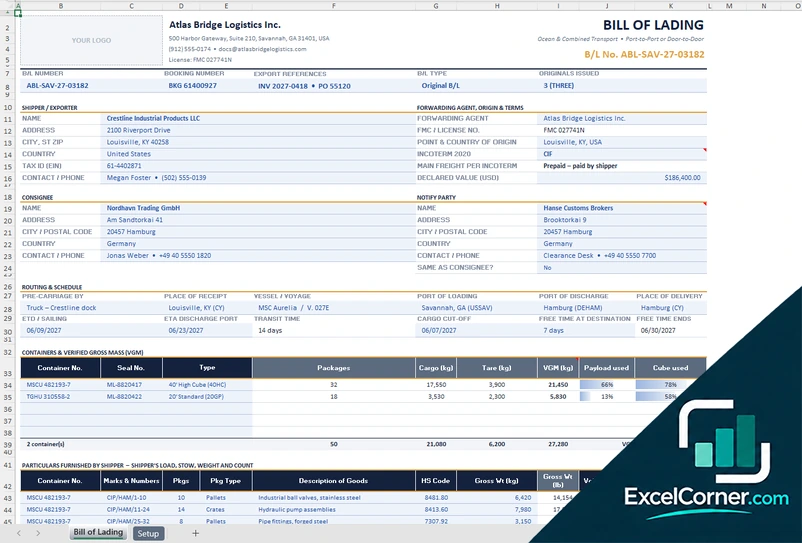
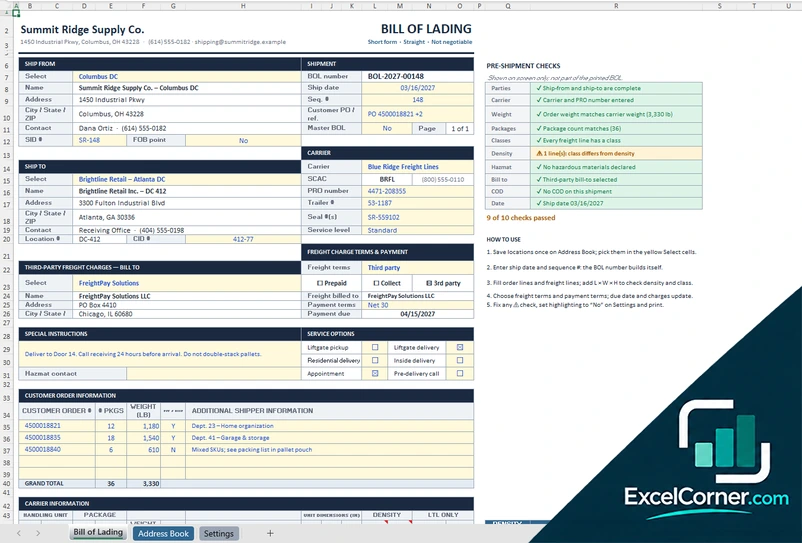
Previewing: Version 1 · Straight BOL with Freight Class. Pick another version on the right.
Instant download · No sign-up · No email
Download these free bill of lading (BOL) templates for Excel to prepare shipping documents and keep track of them. There are six versions: a straight BOL with freight class and charges, a short-form BOL with checks before printing, a BOL generator that prints from a register, a BOL with pre-flight checks, a shipping dashboard that tracks freight spend and carriers, and an ocean bill of lading with containers, routing and Incoterms.
Choose your version
- File
- .xlsx · 22 KB · 2 sheets
- Works with
- Microsoft Excel (.xlsx)
- Macros
- None · formulas only
- Price
- Free
Prepare a bill of lading in an Excel spreadsheet
A bill of lading, or BOL, is the document that a carrier issues to a shipper when it takes goods to transport. It works as a receipt for the goods, as the contract of carriage and, for some kinds of bills of lading, as a document of title. It lists who ships the goods, who receives them, who carries them, what the goods are, how much they weigh and who pays the freight. Filling in a new document by hand each time is slow and invites mistakes, and a spreadsheet can reuse addresses, calculate totals and keep a record of every shipment.
These Excel BOL templates cover three situations. For domestic truck freight there are four versions of the document: a straight bill of lading with freight class and charge estimate, a short-form BOL with checks before printing, a BOL generator that prints any bill of lading from a register of your shipments, and a BOL that flags missing data with pre-flight checks. Two of them, the generator and the shipping dashboard, also work as a system: you keep an address book and the goods of each shipment, log every BOL in a register with its freight, payment and proof of delivery, and read the freight spend, the cost per hundredweight, the on-time delivery and a carrier scorecard. The last version is an ocean bill of lading with the shipper, the forwarding agent, the consignee and the notify party, a routing and schedule block, containers with verified gross mass, and the Incoterms that decide who pays the main freight.
Best for
- Shippers, warehouses and small manufacturers that send freight by truck
- Freight forwarders and exporters that issue ocean bills of lading
- Logistics and accounting teams that need a register of BOLs, freight charges and proofs of delivery
Maybe not for
A transport management system, a carrier portal or an electronic bill of lading service. These templates are Excel files that you fill in, print or save as a PDF. They do not replace the terms of your carrier or the legal requirements of your shipment.
Which version is right for you?
All six are free, formula-driven Excel files with made-up sample shipments that you can replace. They are independent, so you can download more than one.
Version 1
Straight BOL with Freight Class
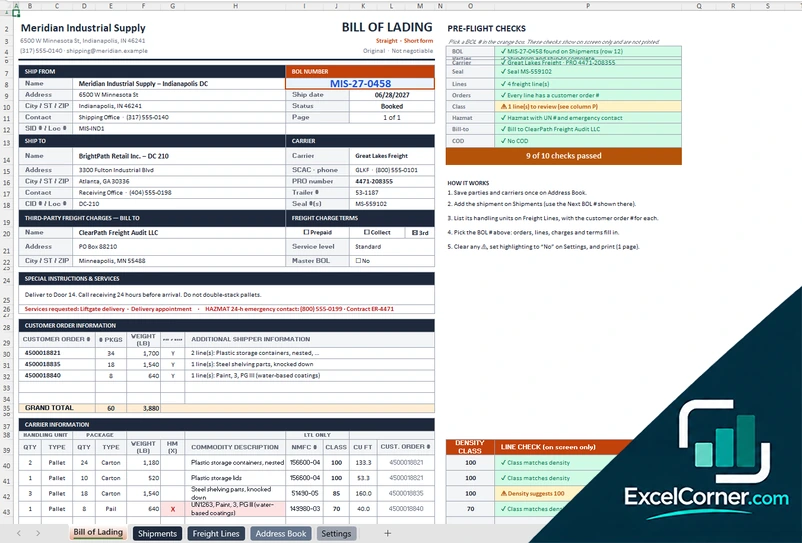
A straight BOL with shipper, consignee and carrier boxes, customer orders, handling units with density and freight class, accessorial fees, a charge estimate and document checks.
Bill of LadingSetup
.xlsx · 22 KB
Version 2
BOL Generator and Register
Choose a BOL number and the generator prints the bill of lading from your register, address book and line items, with a register that tracks freight, payment and proof of delivery.
BOL GeneratorBOL RegisterLine ItemsAddress Book
.xlsx · 71 KB
Version 3
Ocean Bill of Lading
An ocean B/L with shipper, forwarding agent, consignee and notify party, routing and schedule, containers with seal and VGM, particulars of the goods and an Incoterm that sets the main freight.
Bill of LadingSetup
.xlsx · 25 KB
Version 4
Short-Form BOL with Checks
A short-form BOL with checks before shipping, parties chosen from an address book, handling units with weight and freight class from a density scale, and a settings sheet.
Bill of LadingAddress BookSettings
.xlsx · 31 KB
Version 5
Shipping Dashboard with BOL Print
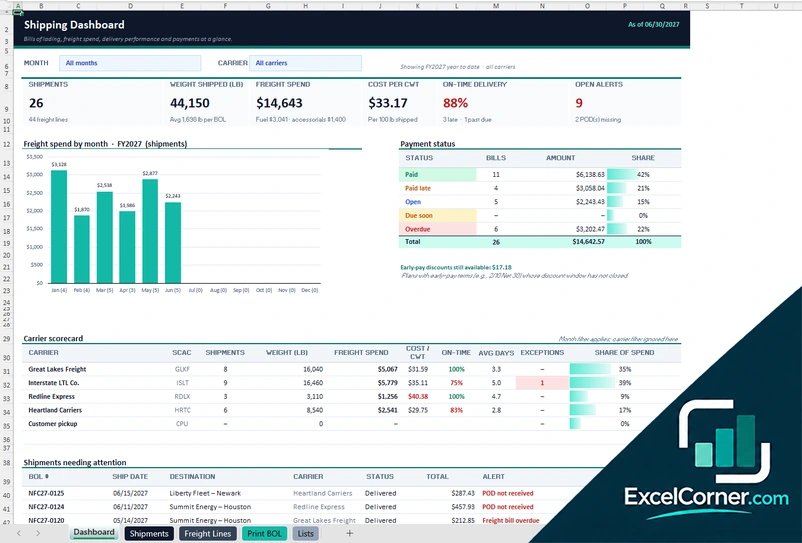
A BOL system with a dashboard of shipments, weight, freight spend, cost per CWT and on-time delivery, a carrier scorecard, a register of BOLs, freight lines and a print sheet for any BOL.
DashboardShipmentsFreight LinesPrint BOLLists
.xlsx · 98 KB
Version 6
BOL with Pre-Flight Checks and Register
A BOL with pre-flight checks that flag missing data, a register of about 100 shipments, about 400 freight lines, an address book and settings, with the bill of lading filled in from the register.
Bill of LadingShipmentsFreight LinesAddress BookSettings
.xlsx · 115 KB
What is inside the bill of lading Excel templates
Version 1: Straight BOL with Freight Class
The Bill of Lading sheet is a short-form straight bill of lading. The header holds the company, the BOL number, the ship date, the customer PO, the freight terms (prepaid, collect or third party), the payment plan and the payment due date. It has boxes for the ship-from, ship-to and carrier details, including the SCAC, the PRO number, the trailer and seal numbers, the pickup date, the driver and the tractor, a block for the party billed for the freight and for a third party, the accessorial services requested with their fee, special instructions and the 24-hour hazmat emergency contact. A table lists the customer orders with the packages and the weight. The carrier information lists each handling unit with the quantity, the type, the packages, the commodity description, the weight, the dimensions, and the calculated cube and density, an estimated freight class from a density scale, the NMFC item number, an optional class override and the rated class, with totals and a hazmat mark. A freight charge estimate works out the line-haul from the class rates, applies a minimum charge and adds the accessorials, and further boxes hold the declared value, COD and liability, document checks and the signatures. The Setup sheet holds the density scale of 13 tiers, an example class rate table, the accessorial fees, the payment plans, the pricing rules and the lists.
Version 2: BOL Generator and Register
The BOL Generator has a control panel where you pick a BOL number, and the page fills in the bill of lading from your data: the dates, the carrier, the PRO number, the freight terms, the payment plan, the trailer and seal, the delivery status and the payment due date, the ship-from, ship-to and bill-freight-charges-to parties, the line items with handling units, packages, commodity, weight, NMFC item and class, the freight charges and payment, the proof of delivery and the signature boxes. The BOL Register holds one row for each bill of lading, up to about 200, with the BOL number, the ship date, the shipper, the consignee, the third-party bill-to, the carrier, the PRO number, the trailer and seal, the freight terms, the payment plan, the weight, the freight charges, the payment due date, the amount paid, the balance, the payment status, the delivery status, the date and the signer of the proof of delivery, the transit days and alerts. Cards at the top show the BOLs issued, the weight shipped, the freight charges, the outstanding balance, the missing proofs of delivery and the hazmat BOLs. The Line Items sheet holds the goods of every BOL, up to about 400 lines, and the Address Book holds your company, the parties, the carriers with their dispatch phone, the payment plans and the other lists.
Version 3: Ocean Bill of Lading
The Bill of Lading sheet has a space for your logo and a header with the B/L number, the booking number, the export references, the B/L type and the number of originals issued. It then lists the shipper or exporter with a tax ID and the declared value, the forwarding agent, the point and country of origin, the Incoterm and who pays the main freight, the consignee and the notify party, with a choice to make the notify party the same as the consignee. A routing and schedule block gives the pre-carriage, the place of receipt, the vessel and voyage, the port of loading, the port of discharge, the place of delivery, the sailing and arrival dates, the transit time, the cargo cut-off and the free time. A table of containers and verified gross mass lists the container number, the seal number, the type, the packages, the cargo weight, the tare, the verified gross mass, the payload used and the cube used, and the particulars furnished by the shipper list the marks and numbers, the packages, the description of the goods, the HS code, the weights and the volume. The Setup sheet holds your company as carrier or forwarder, the Incoterms 2020 for ocean freight, the equipment specifications, the payment plans, whether to hold the original B/L until paid, the charge codes and the lists.
Version 4: Short-Form BOL with Checks
The Bill of Lading sheet shows a set of pre-shipment checks that tell you what is missing before you print. It has the BOL number, the ship date and the freight terms, the ship-from, ship-to and carrier details, which you choose from the Address Book, the handling units with the quantity, the type, the weight and the dimensions, the calculated density and freight class, the totals, the hazmat details and the signatures. The Settings sheet holds your company, the payment plans and a density scale of 13 tiers for the freight class.
Version 5: Shipping Dashboard with BOL Print
The Dashboard shows the shipments, the weight shipped, the freight spend, the cost per hundredweight, the on-time delivery rate and the open alerts, with a chart of the freight spend by month, a summary of the payment status, a carrier scorecard and a list of the shipments that need attention. The Shipments sheet is a register of about 100 BOLs, the Freight Lines sheet holds about 300 lines of goods, the Print BOL sheet prints the bill of lading of the BOL that you select, and the Lists sheet holds the carriers, the parties and the other lists.
Version 6: BOL with Pre-Flight Checks and Register
The Bill of Lading sheet starts with pre-flight checks that flag anything missing, and then shows the BOL that you pick from the register: the ship-from, ship-to and carrier details, the references, the freight terms, the goods and the signatures. The Shipments sheet holds a register of about 100 BOLs, the Freight Lines sheet holds about 400 lines of goods, the Address Book holds the parties and the carriers, and the Settings sheet holds your company, the payment plans and the lists.
How to use a bill of lading template in Excel
- Download
Pick the version you want and open it in Excel. The files have sample shipments for a made-up company, so you can see how each sheet works. - Set up your lists
On the setup or address book sheet, enter your company, your parties and carriers, your payment plans and your lists, such as handling unit types and freight classes. - Fill in the shipment
Choose the shipper, the consignee and the carrier, then enter the references, the dates and the goods with their packages, weight and dimensions. - Check the totals
Look at the weight, the freight class, the charges and the document checks. The template calculates them from the lines that you entered. - Print and keep a record
Print the bill of lading or save it as a PDF, and log the shipment, the payment and the proof of delivery in the register if the template has one.
Replace the sample content with your own. The totals, the freight classes, the charges and the payment dates update on their own.
Which bill of lading template do you need?
| Version | Best for | Main outputs | Sheets |
|---|---|---|---|
| 1 – Straight BOL with Freight Class | Shippers and warehouses that send truck freight | Density, freight class, rate, accessorials, charge estimate, document checks | 2 |
| 2 – BOL Generator and Register | Logistics teams that print BOLs from a register | BOLs issued, weight shipped, freight charges, balance, missing POD, hazmat BOLs | 4 |
| 3 – Ocean Bill of Lading | Exporters and forwarders that ship by sea | Routing, containers, VGM, Incoterm, main freight, B/L type and originals | 2 |
| 4 – Short-Form BOL with Checks | Small shippers that need a quick, correct document | Pre-shipment checks, address book, handling units, density and freight class | 3 |
| 5 – Shipping Dashboard with BOL Print | Managers who watch freight spend and carriers | Freight spend by month, cost per CWT, on-time delivery, carrier scorecard, BOL print | 5 |
| 6 – BOL with Pre-Flight Checks and Register | Dispatchers who prepare many BOLs a week | Pre-flight checks, register of about 100 BOLs, freight lines, address book | 5 |
They are separate files, so you can use more than one.
Tips for a correct bill of lading
- Use the exact legal names and addresses of the shipper, the consignee and the carrier, as they appear on the order and on the contract.
- Describe the goods clearly, with the number and the type of the packages, and match them to the packing list and the commercial invoice.
- Weigh the shipment and measure the handling units. The freight class and the freight charge depend on them.
- Mark dangerous goods and give the emergency contact when the shipment includes them.
- State the freight terms, prepaid, collect or third party, so that the right party is billed.
- Keep the signed copy and the proof of delivery, because freight claims and invoices depend on them.
- Keep a register of every shipment with its number, so that you can find a document in seconds.
Frequently asked questions
Are these bill of lading templates for Excel free?
Yes. All six versions are free to download as .xlsx files. You do not need an account or an email address.
Which version should I choose?
Choose the Straight BOL with Freight Class (Version 1) for a domestic truck shipment with freight class, accessorials and a charge estimate, or the Short-Form BOL with Checks (Version 4) if you want a quicker form with an address book. Choose the BOL Generator and Register (Version 2) or the BOL with Pre-Flight Checks and Register (Version 6) if you issue many BOLs and want to print each one from a register. Choose the Shipping Dashboard with BOL Print (Version 5) to follow the freight spend, the carriers and the payments. Choose the Ocean Bill of Lading (Version 3) for a shipment by sea with containers, routing and Incoterms.
What is a bill of lading?
A bill of lading is a document that a carrier issues to confirm that it has received goods for transport. It describes the goods, names the parties and the route, and serves as a receipt and as evidence of the contract of carriage.
What does BOL mean?
BOL is the usual abbreviation of bill of lading, and you will also see it written B/L, especially for ocean freight. A BOL template is a blank form that you fill in for each shipment.
What is a straight bill of lading?
A straight bill of lading is non-negotiable. It names a specific consignee, and the goods are delivered only to that party. Versions 1, 4 and 6 are straight bills of lading for domestic truck freight.
What information goes on a bill of lading?
It normally includes the BOL number, the date, the shipper, the consignee, the carrier, the origin and the destination, the number and the type of packages, a description and the weight of the goods, the freight class for truck shipments, the freight terms and the signatures. Ocean bills also show the vessel, the ports and the container and seal numbers.
Can I get a blank BOL template in Excel?
Yes. Each version opens with made-up sample shipments so that you can see how it works. Delete the sample rows or overwrite them with your own data, and the totals, the freight classes and the charges update on their own.
How do I make a bill of lading in Excel?
Lay out the boxes of the document on a sheet, and keep your addresses, carriers and goods in lists, so that you can choose them instead of typing them. The templates do that, and they also calculate the weight, the freight class and the charges.
Can I use these templates as a legal bill of lading?
They follow the usual layout of the document and you can print them or save them as a PDF. The terms of a bill of lading depend on the carrier, the contract and the countries involved, so check them with your carrier or forwarder.
More free logistics templates
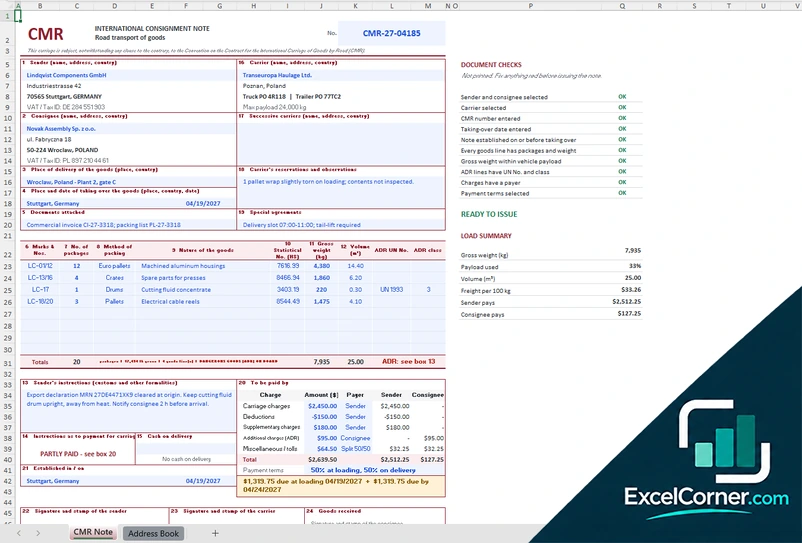
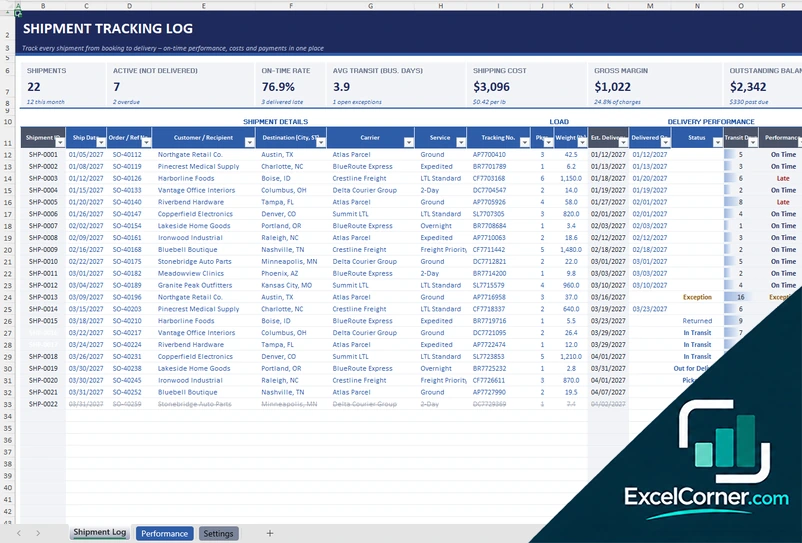
These templates are document and tracking tools with made-up sample data. They are not legal documents or legal advice. Check your carrier agreements, local law and customs rules, because the terms of a bill of lading or a CMR note depend on the contract and the countries involved. Excel is a trademark of Microsoft Corporation; Excel Corner is not affiliated with Microsoft.