
Home › Operations, Inventory & Logistics › Workflow Excel Template
Previewing: Version 1 · Workflow Tracker with Dashboard. Pick another version on the right.
Instant download · No sign-up · No email
Download these free workflow templates for Excel to plan, run and monitor a process. One version is a workflow tracker with tasks, dependencies, costs and a dashboard, one is a request workflow with stages, service-level targets and payment follow-up, and one is a step-by-step workflow plan with an automatic schedule and a process map by owner.
Choose your version
- File
- .xlsx · 36 KB · 3 sheets
- Works with
- Microsoft Excel (.xlsx)
- Macros
- None · formulas only
- Price
- Free
Manage a workflow in an Excel spreadsheet
A workflow is a repeatable sequence of steps that moves work from a start to a finish, such as approving a purchase, onboarding a customer or launching a project. Managing a workflow means knowing who is responsible for each step, when it should be done, what depends on what, how long it really takes and where work gets stuck. A spreadsheet is a practical tool for this: you list the steps once, and formulas can schedule them, flag the late ones and total the costs.
These Excel templates look at a workflow from three angles. The first is a workflow tracker with tasks in stages, an owner, a predecessor, dates, hours, rates and costs, a weekly timeline and a dashboard of progress, budget, workload and task health. The second is built for requests that move through approval stages: each request has stage dates and a service-level clock, and the control center shows the requests in each stage, the ones that breach their target, the monthly throughput and the payments that are past due. The third is a workflow plan that schedules itself from the duration and the dependencies of each step and draws a process map with a swimlane for each owner.
Best for
- Operations and process managers who design and improve workflows
- Teams that handle requests and approvals and need to meet service-level targets
- Project leads and small business owners who plan a process step by step with owners, dates and costs
Maybe not for
A workflow automation tool or a project management platform with boards, automations and notifications. These templates are Excel files for planning, tracking and reporting, and they work well next to those tools or when you want to keep things simple.
Which version is right for you?
All three are free, formula-driven Excel files with sample data you can replace. They are independent, so you can download more than one.
Version 1
Workflow Tracker with Dashboard
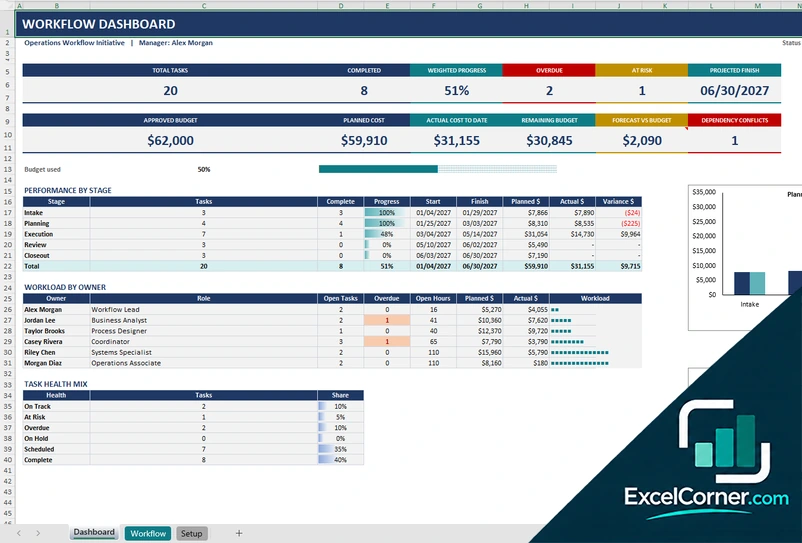
List your tasks by stage with owners, predecessors, dates, hours and costs and get a dashboard of progress, overdue and at-risk tasks, budget, workload by owner and task health.
DashboardWorkflowSetup
.xlsx · 36 KB
Version 2
Request Workflow Control Center
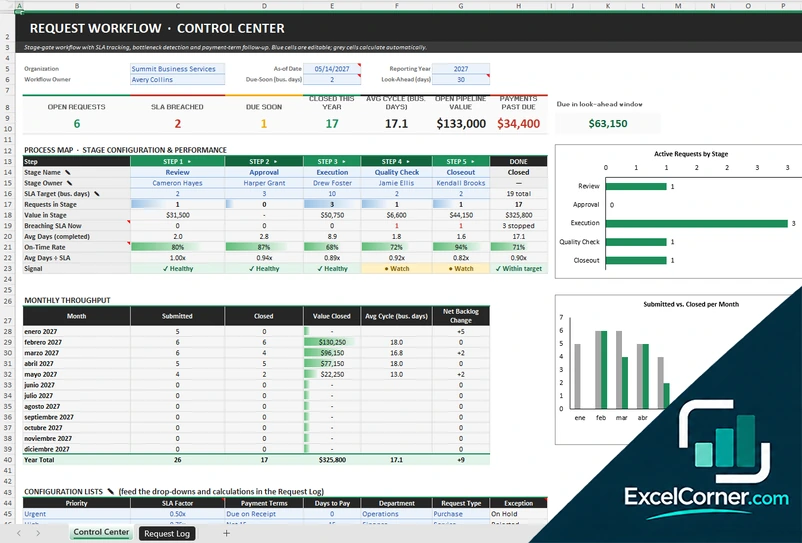
Log each request with the date that every stage was finished and see the stage it is in, its SLA status, the cycle time and the payment follow-up, plus a process map and monthly throughput.
Control CenterRequest Log
.xlsx · 43 KB
Version 3
Workflow Plan with Process Map
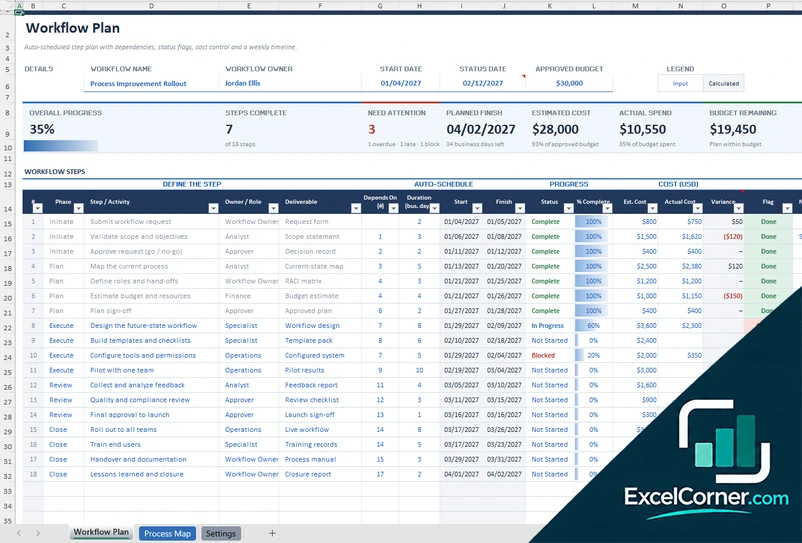
Define each step with an owner, a deliverable, a duration and a predecessor and get the start and finish dates, the status, the cost against the budget and a process map with a swimlane for each owner.
Workflow PlanProcess MapSettings
.xlsx · 33 KB
What is inside the workflow Excel templates
Version 1: Workflow Tracker with Dashboard
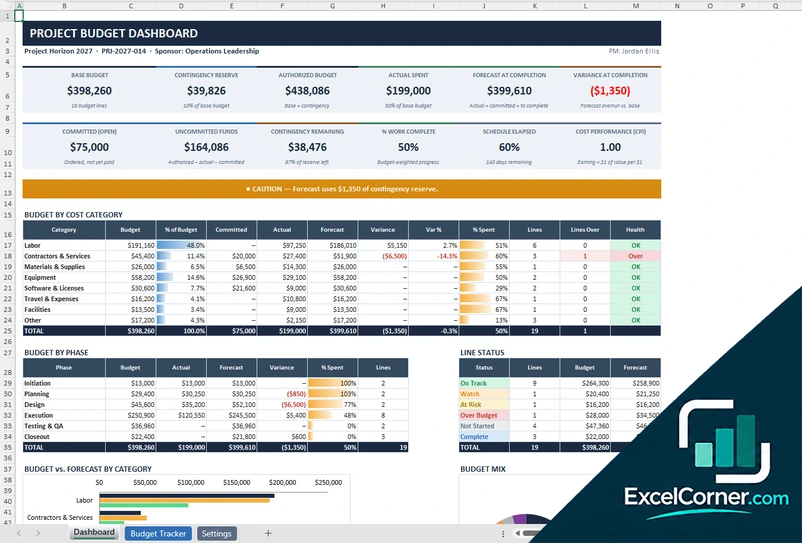
The Workflow sheet lists the tasks of the workflow: the stage, the task, the owner, the priority, the predecessor, the start and due dates, the work days, the status, the percentage complete, the estimated hours, the rate, other costs, the planned cost, the actual cost, the variance, a health flag, the days left and a check on the dependency, with a weekly timeline on the right. The Dashboard shows the total tasks, the completed tasks, the weighted progress, the overdue and at-risk tasks and the projected finish, then the approved budget, the planned cost, the actual cost to date, the remaining budget, the forecast against the budget and the dependency conflicts, with a bar for the budget used. It also gives the performance by stage with the progress, the dates and the planned and actual cost, the workload by owner with the open tasks, the overdue tasks and the open hours, the task health mix and charts of the planned versus the actual cost by stage and of the task health. The Setup sheet holds the project settings, the approved budget, the at-risk threshold, the team members with their rates, the stages, the statuses, the priorities and the holidays.
Version 2: Request Workflow Control Center
The Control Center starts with the settings of the workflow: the organization, the as-of date, the reporting year, the workflow owner, the due-soon window in business days and the look-ahead in days. Seven cards show the open requests, the SLA breached, the requests due soon, the requests closed this year, the average cycle time in business days, the open pipeline value and the payments past due. A process map lists the stages (for example review, approval, execution, quality check and closeout) with the stage owner and the SLA target that you can edit, and shows for each stage the requests in it, their value, the requests breaching the SLA now, the average days of the completed ones, the on-time rate, the average days divided by the SLA and a signal. A monthly throughput table gives the requests submitted, the value closed, the average cycle time and the net backlog change for each month, with two charts, one of the active requests by stage and one of the requests submitted against the requests closed. The Request Log has one row for each request with the ID, the date submitted, the title, the department, the requester, the priority, the value, the payment terms, an exception flag and the date that each stage was completed. It calculates the current stage, the progress, the days in the stage, the SLA, the stage due date, the SLA status, the cycle time, the payment due date, the date paid and the payment status.
Version 3: Workflow Plan with Process Map
The Workflow Plan sheet has a details block with the workflow name, the owner, the start date, the status date and the approved budget, and cards for the overall progress, the steps complete, the steps that need attention, the planned finish, the estimated cost, the actual spend and the budget remaining. Below it, the workflow steps are listed by phase with the step, the owner or role, the deliverable, the steps it depends on and the duration in business days. The sheet schedules the start and finish dates from the dependencies, and you enter the status, the percentage complete, the estimated and actual cost, with the variance, a control flag and notes, and a timeline runs along the right side. The Process Map sheet shows the steps in swimlanes, one for each owner or role, on a calendar, with a color for each state: on track, due soon, overdue, late start, blocked or upcoming. It also lists the steps, the workdays and the steps that need attention for each owner, and a phase summary with the progress, the dates, the estimated and actual cost and the variance, with a chart. The Settings sheet explains how to use the template and holds the phases, the owners and roles, the statuses and the holidays.
How to use a workflow template in Excel
- Download
Pick the version you want and open it in Excel. The files have a sample workflow for a made-up organization, so you can see how each sheet works. - Set it up
On the setup or settings sheet, enter the name of the workflow, the owner, the start and status dates, the budget, and your lists of stages, owners, rates and statuses. - List the steps or requests
Add one row for each task or step with its owner, duration and predecessor, or one row for each request with its dates. Yellow or blue cells are inputs. - Update the status
Change the status and the percentage complete, or enter the date that each stage was finished. Dates, flags and totals update on their own. - Review and improve
Look at the dashboard or the control center for overdue steps, bottlenecks, budget and workload, and change the workflow where it slows down.
Replace the sample workflow with your own. The schedule, the health flags, the costs and the charts update on their own.
Which workflow template do you need?
| Workflow Tracker with Dashboard | Request Workflow Control Center | Workflow Plan with Process Map | |
|---|---|---|---|
| For | Tasks, dependencies and costs | Requests, stages and service levels | A step plan with an automatic schedule |
| Best for | Process and project teams | Approval, procurement and service teams | Designing and rolling out a workflow |
| Main outputs | Progress, overdue and at-risk tasks, planned vs. actual cost, workload by owner | Requests by stage, SLA breaches, cycle time, throughput, payments past due | Auto-schedule, status flags, budget, process map by owner |
| Sheets | 3 | 2 | 3 |
| Charts | Yes | Yes | Yes |
They are separate files, so you can use more than one.
Tips for a better workflow
- Map the real process first, as it is done today, and only then decide what to change.
- Give each step one owner, so that it is always clear who has to act next.
- Write down dependencies, because a late step moves everything behind it.
- Set a time target for each stage and measure how long it really takes.
- Look for the stage where requests wait the longest. That is the bottleneck.
- Record the cost of each step, in hours and in money, to see where the process is expensive.
- Review the workflow on a schedule and remove steps that add no value.
Frequently asked questions
Are these workflow templates for Excel free?
Yes. All three versions are free to download as .xlsx files. You do not need an account or an email address.
Which version should I choose?
Choose the Workflow Tracker with Dashboard (Version 1) to manage tasks, dependencies, costs and the weekly timeline of a workflow. Choose the Request Workflow Control Center (Version 2) if requests move through approval stages and you need to meet service-level targets. Choose the Workflow Plan with Process Map (Version 3) to design a workflow step by step with an automatic schedule and a map by owner.
What is a workflow?
A workflow is a series of steps that a piece of work goes through from start to finish, with a person or a team responsible for each step. Examples are a purchase approval, an invoice process or an employee onboarding.
How do I create a workflow in Excel?
List the steps in a table with the owner, the duration and the step that comes before it, and then let formulas calculate the start and finish dates, the status and the cost. The templates already contain those formulas, so you only enter the steps.
What is an SLA in a workflow?
An SLA, or service-level agreement, is the time that you commit to for a step or for a whole request. Version 2 lets you set a target in business days for each stage and shows which requests are over it.
Can I track the cost of a workflow?
Yes. Version 1 and Version 3 calculate the planned cost of each task from the hours and the rate or from an estimate, compare it with the actual cost and show the variance against an approved budget.
Can I change the stages and the owners?
Yes. Each template has a setup or settings sheet with lists of stages or phases, owners or roles and statuses, and the dropdowns and the reports use the values that you enter.
Does the template work in Google Sheets?
The files are made for Microsoft Excel and use standard formulas with no macros. You can upload them to Google Drive and open them with Google Sheets, but some formatting or charts may look different.
Is my information stored online?
No. The templates are plain Excel files, so the names, addresses, dates and amounts you type stay in your own file on your own computer.
These templates are documentation tools with made-up sample content. Review every SOP with the people who do the work and with your quality, safety and legal teams before you rely on it. Excel is a trademark of Microsoft Corporation; Excel Corner is not affiliated with Microsoft.