
Home › Operations, Inventory & Logistics › 3PL Pricing Template Excel
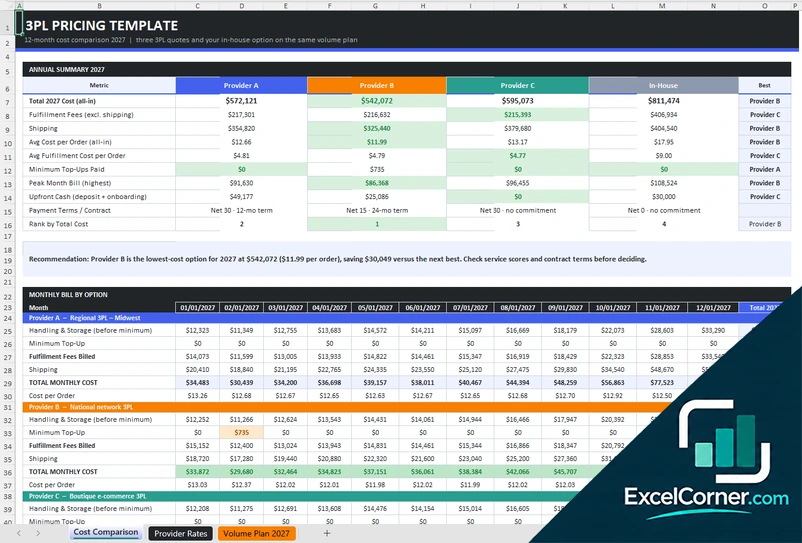
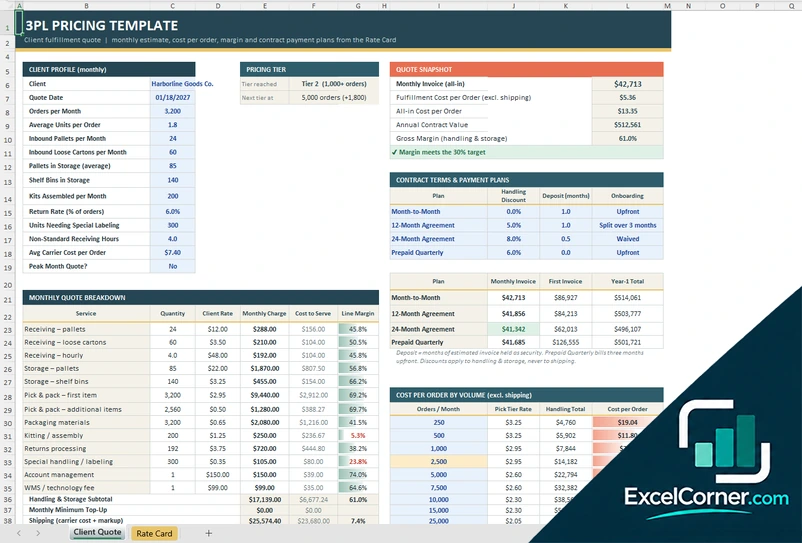
Previewing: Version 1 · 3PL Cost Comparison for Three Providers and In-House. Pick another version on the right.
Instant download · No sign-up · No email
Download these free 3PL pricing templates in Excel. One compares the 12-month cost of three third-party logistics providers and your in-house option. One quotes a fulfillment client from a rate card, with the monthly invoice, the cost to serve and the margin.
Choose your version
- File
- .xlsx · 28 KB · 3 sheets
- Works with
- Microsoft Excel (.xlsx)
- Macros
- None · formulas only
- Price
- Free
Price 3PL fulfillment in an Excel spreadsheet
A 3PL bill is made of many parts: receiving, storage, pick and pack, packaging, returns, minimums and shipping. Each provider charges them in a different way, so the quotes are hard to compare. In Excel you enter each rate once, apply the same volume plan, and see the real cost per order for each option.
These two templates look at 3PL pricing from both sides. Version 1 is for the company that buys fulfillment: it compares three providers and an in-house option over 12 months. Version 2 is for the 3PL that sells it: it builds a client quote from a rate card and checks the margin.
Best for
- E-commerce brands that choose a fulfillment partner
- Operations managers who compare a 3PL with an in-house warehouse
- 3PL sales teams that quote clients with volume tiers and contracts
Maybe not for
A warehouse management system that bills clients from real transactions. These are Excel files: you type the rates and the volumes, and the quote and the comparison are calculated from them.
Which version is right for you?
Both are free, formula-driven Excel files with sample data you can replace. They are independent, so you can download both.
Version 1
3PL Cost Comparison for Three Providers and In-House
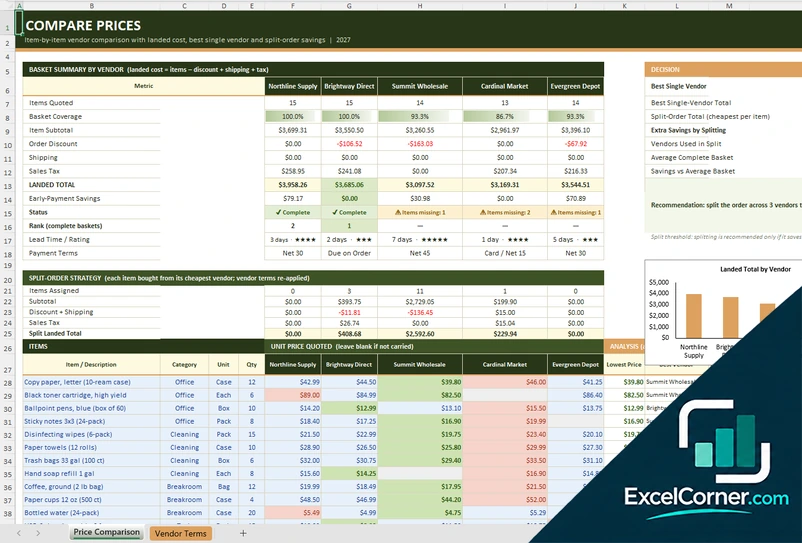
A 3PL cost comparison with provider rate cards, a monthly volume plan, a 12-month bill for each option, a ranking and a recommendation with a chart.
Cost ComparisonProvider RatesVolume Plan 2027
.xlsx · 28 KB
Version 2
3PL Client Quote with Rate Card
A 3PL client quote with a monthly estimate, cost per order, gross margin against a target, contract payment plans, volume tiers and a rate card with internal cost standards.
Client QuoteRate Card
.xlsx · 19 KB
What is inside the 3PL pricing templates
Version 1: 3PL Cost Comparison for Three Providers and In-House
On the Provider Rates sheet you enter each 3PL’s rate card as quoted, plus your in-house option. It covers inbound and storage, order fulfillment, fixed fees, minimums, shipping, and the payment and contract terms. The Volume Plan 2027 sheet holds the monthly orders and inventory that every provider is priced on.
The Cost Comparison sheet builds the monthly bill for each option. It shows the annual total, the fulfillment fees, the shipping, the cost per order, the peak month, the upfront cash and the rank, with a recommendation and a chart.
Version 2: 3PL Client Quote with Rate Card
On the Client Quote sheet you enter the client profile: orders per month, units per order, pallets, bins, kits, returns and special handling. It finds the pricing tier by volume, builds the monthly invoice and shows the cost per order, the annual contract value and the gross margin against your target.
It compares month-to-month, 12-month, 24-month and prepaid plans, and charts the cost per order by volume. The Rate Card sheet holds the activity rates, the pick and pack tiers and the internal cost standards.
How to use a 3PL pricing template in Excel
- Download
Pick the version for your side and open it in Excel. Each file has sample rates and volumes. - Enter the volumes
Add the orders, the units per order, the pallets and the returns per month. - Enter the rates
Type each provider’s rates as quoted, or your own rate card, with the minimums and the payment terms. - Compare or quote
Read the total cost, the cost per order and the rank of each provider, or the monthly invoice and the margin. - Decide
Check the contract terms and the service levels before you choose or send the quote.
Replace the sample rates and volumes with your own. The bills, the comparison and the margins update on their own.
Which 3PL pricing template do you need?
| 3PL Cost Comparison | 3PL Client Quote with Rate Card | |
|---|---|---|
| You enter | Rates of 3 providers and a volume plan | Client volumes and your rate card |
| Best for | Choosing a provider | Quoting a fulfillment client |
| You get | Cost per order, 12-month bill, rank, recommendation | Monthly invoice, cost to serve, margin, contract plans |
| Sheets | 3 | 2 |
| Charts | 1 | 1 |
They are separate files, so you can use both.
Tips for comparing 3PL prices
- Use the same volume plan for every provider, so the comparison is fair.
- Include the minimums, the onboarding fees and the shipping, not only the pick fee.
- Look at the peak month, because seasonality drives the bill.
- Ask for the rates for each activity: receiving, storage, pick and pack, returns.
- Check the contract term and what happens if your volume drops.
Frequently asked questions
Are these 3PL pricing templates free?
Yes. Both versions are free to download as .xlsx files. You do not need an account or an email address.
Which version should I choose?
Choose the 3PL Cost Comparison (Version 1) if you are a brand that buys fulfillment and wants to compare providers. Choose the Client Quote with Rate Card (Version 2) if you are a 3PL and need to quote a client.
What costs does a 3PL charge?
Usually receiving, storage, pick and pack, packaging materials, returns, special handling, account fees and shipping. Many also have a monthly minimum and an onboarding fee. Both templates have a line for each.
How do I compare 3PL quotes in Excel?
Put the same monthly orders, pallets and returns in a volume plan, then apply each provider’s rates to it. Compare the total cost and the cost per order. Version 1 does this for three providers and your in-house option.
How do I price my own 3PL services?
List your rates per activity, add the cost to serve, such as labor minutes and materials, and apply volume tiers. The margin is the difference. Version 2 checks it against a target, for example 30 percent.
More free logistics and pricing templates
These templates use made-up sample rates and volumes. Replace them with the real quotes from each provider, and check the contract terms before you decide. Excel is a trademark of Microsoft Corporation; Excel Corner is not affiliated with Microsoft.