
Home › Calendars, Schedules & Productivity › Habit Tracker Template Excel
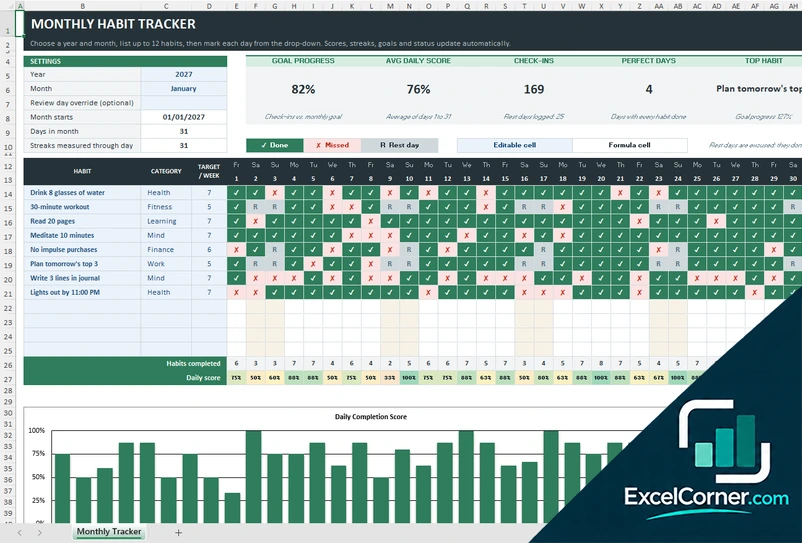
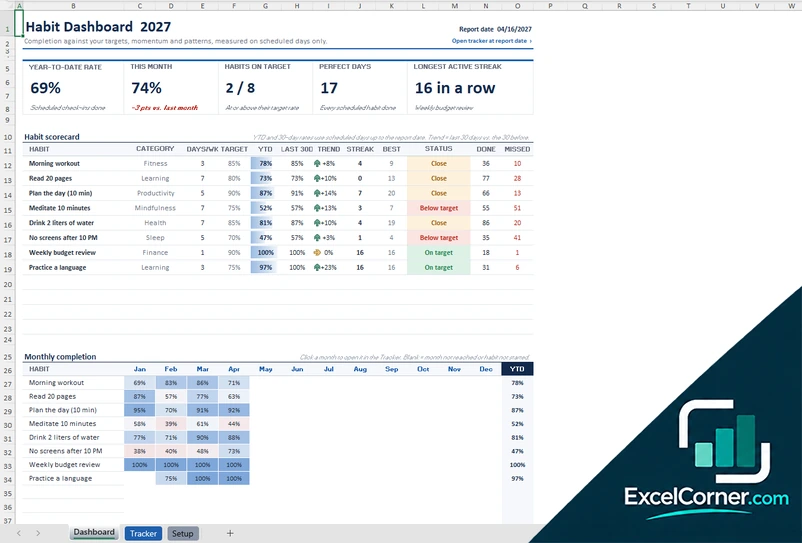
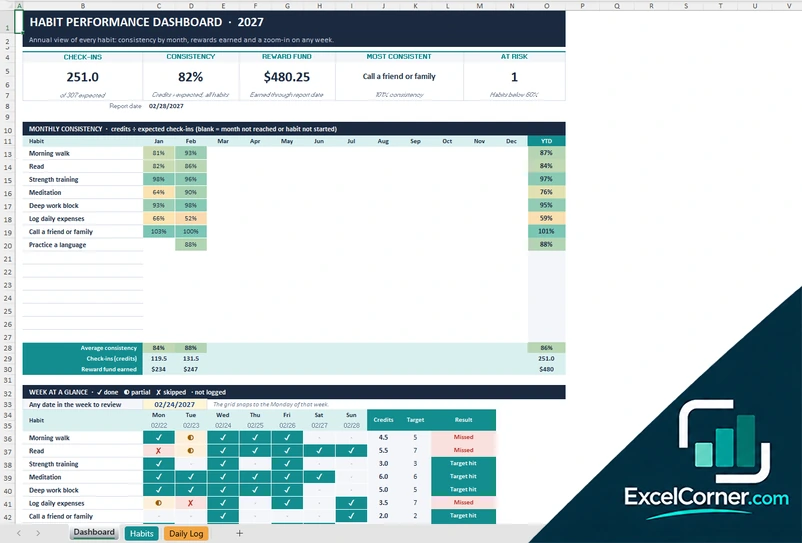
Previewing: Version 1 · Monthly Habit Tracker. Pick another version on the right.
Instant download · No sign-up · No email
Use these free habit tracker templates for Excel to build a habit and see your progress. One version is a monthly habit tracker where you check off each day, one is a yearly tracker with a dashboard of completion, streaks and trends, and one is a daily habit log that tracks amounts and a reward fund.
Choose your version
- File
- .xlsx · 22 KB · 1 sheets
- Works with
- Microsoft Excel (.xlsx)
- Macros
- None · formulas only
- Price
- Free
Track your habits in an Excel spreadsheet
A habit tracker is a table where you mark each day you did a habit. A row of checks keeps you going, and a gap shows where you slipped. In Excel the tracker also works out the share of days done, your current and best streaks, and which habits are on target.
These Excel habit tracker templates give you three versions. Version 1 is a monthly tracker for up to 12 habits, marked done, missed or rest day. Version 2 is a yearly tracker where you type an x on each day, with a dashboard of streaks and trends. Version 3 is a daily log with one row per habit per day that records amounts and a reward for each check-in.
Best for
- Anyone who wants to build a daily routine, such as exercise, reading or drinking water
- People who like to see streaks, scores and a dashboard of their progress
- Anyone who wants to track the amount of a habit, such as minutes or pages, and not only whether it was done
Maybe not for
A phone app with reminders and notifications. These templates are Excel files that you update yourself.
Which version is right for you?
All three are free, formula-driven Excel files with sample data you can replace. They are independent, so you can download more than one.
Version 1
Monthly Habit Tracker
Pick a month, list up to 12 habits and mark each day as done, missed or a rest day, and see the scores, the streaks and a daily completion chart.
Monthly Tracker
.xlsx · 22 KB
Version 2
Yearly Habit Tracker with Dashboard
Define each habit with a cue and the days of the week, type an x on the days you do it, and see completion, streaks and trends on a dashboard.
DashboardTrackerSetup
.xlsx · 216 KB
Version 3
Daily Habit Log with Rewards
Log each habit by the day with a status and an amount, and see the consistency, the check-ins and the reward fund you earn.
DashboardHabitsDaily Log
.xlsx · 132 KB
What is inside the habit tracker Excel templates
Version 1: Monthly Habit Tracker
On the Monthly Tracker sheet you choose the year and month and list up to 12 habits, each with a category and a target number of days a week. You mark each day from a dropdown as done, missed or a rest day.
For each habit you get days done, progress, current streak, best streak and status, and each day gets a daily score. The top shows goal progress, perfect days and the longest active streak, with a chart of the daily score.
Version 2: Yearly Habit Tracker with Dashboard
The Setup sheet holds the tracking year and the habits, each with a category, a cue, planned weekdays, a start date and a target rate. In the Tracker sheet you type an x on each day a habit is done.
The Dashboard shows year-to-date completion, habits on target, perfect days and the longest streak, with a scorecard per habit, completion by month and two charts of monthly and weekday completion.
Version 3: Daily Habit Log with Rewards
The Habits sheet is where you define each habit once, with a category, unit, weekly target, amount goal, reward per check-in and start date. The Daily Log has one row per habit per day with the status (done, partial or skipped), the amount and notes.
The Dashboard shows check-ins, consistency, the reward fund, the most consistent habit, habits at risk and a week-at-a-glance grid.
How to use a habit tracker template in Excel
- Download
Pick the version you want and open it in Excel. The files have sample habits so you can see how they work. - Choose the period
Pick the year and the month in the monthly tracker, or the tracking year on the Setup or Habits sheet. - List your habits
Write each habit with its category and the number of days a week you plan to do it. In the other versions you can also add the cue, the unit, the amount goal or the reward. - Check in every day
Mark each day as done, missed or a rest day from the dropdown, type an x in the day cell, or add a row to the daily log. - Review your progress
Look at the score, the streaks, the status of each habit and the dashboard, and adjust the habits that are below target.
Rest days and days on which a habit is not scheduled do not break a streak.
Which habit tracker template do you need?
| Monthly Habit Tracker | Yearly Habit Tracker with Dashboard | Daily Habit Log with Rewards | |
|---|---|---|---|
| For | A month at a time, up to 12 habits | A whole year of habits with a dashboard | Amounts and rewards for each check-in |
| Best for | Simple daily check-ins | Seeing trends, streaks and completion rates | Habits with a measurable amount |
| Main outputs | Daily score, perfect days, goal progress, streaks | Year-to-date and 30-day completion, streaks, trends by month and weekday | Consistency, check-ins, total amount, reward fund |
| Sheets | 1 | 3 | 3 |
| Charts | Yes | Yes | Yes |
They are separate files, so you can use more than one.
Tips for building habits
- Start with a few habits. Three to five habits are easier to keep than twelve.
- Make each habit small and specific, for example Read 20 pages instead of Read more.
- Tie each habit to a cue, such as after brushing your teeth or when you sit at your desk.
- Mark the habit as soon as you do it, so that you do not forget.
- Use rest days for planned breaks, so that they do not break your streak.
- Review the tracker once a week and drop or change the habits that are always below target.
Frequently asked questions
Are these habit tracker templates for Excel free?
Yes. All three versions are free to download as .xlsx files. You do not need an account or an email address.
Which version should I choose?
Choose the Monthly Habit Tracker (Version 1) for a simple monthly grid with up to 12 habits. Choose the Yearly Habit Tracker with Dashboard (Version 2) to see the whole year with streaks and trends. Choose the Daily Habit Log with Rewards (Version 3) to record amounts and earn rewards.
How do streaks work?
A streak counts the days in a row on which a habit was done. In the monthly tracker, a rest day is excused and does not break the streak. In the yearly tracker, only scheduled days count.
Can I track the amount of a habit?
Yes. The Daily Habit Log with Rewards has a unit for each habit, such as minutes or pages, an amount goal, and a column for the amount you did each day. It adds up the total.
Is there a daily habit tracker?
Yes. The monthly tracker checks off each day of the month, and the daily habit log has one row per habit per day with a status of done, partial or skipped.
More free planning and productivity templates
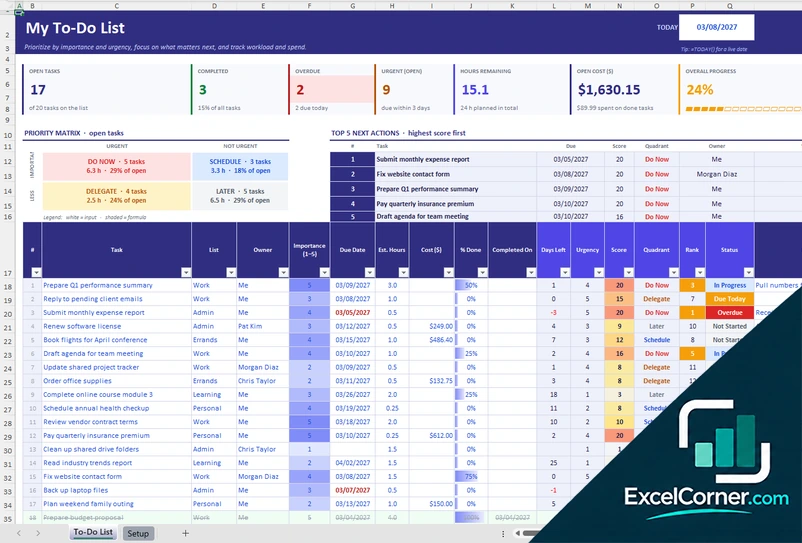
These templates are personal planning tools with sample data. They do not replace medical or professional advice. Excel is a trademark of Microsoft Corporation; Excel Corner is not affiliated with Microsoft.