
Home › Operations, Inventory & Logistics › SOP Template Excel
Previewing: Version 1 · SOP Document. Pick another version on the right.
Instant download · No sign-up · No email
Download these free SOP templates for Excel to write, review and manage your standard operating procedures. One version is a complete SOP document with roles, steps, control points and cost per execution, one is an SOP register that tracks reviews and staff training, and one is an SOP with a decision-based procedure and a checklist you fill in each time you run it.
Choose your version
- File
- .xlsx · 21 KB · 2 sheets
- Works with
- Microsoft Excel (.xlsx)
- Macros
- None · formulas only
- Price
- Free
Write and manage your SOPs in an Excel spreadsheet
A standard operating procedure, or SOP, is a written set of steps that tells people how to do a task in the same way every time. A good SOP says why the procedure exists, who is responsible, what is needed, what the steps are and how you know that it was done correctly. Most teams start with a Word document and end up with outdated copies, unclear owners and no proof that anyone read the procedure. A spreadsheet can help in two ways: it can hold the procedure in a structured form that is easy to fill in and check, and it can track the whole library of SOPs, their review dates and the training of the staff.
These Excel templates cover both. The first is an SOP document: a one-sheet procedure with a header, purpose, scope, definitions, roles and responsibilities, tools and materials, numbered steps with control points, a cost and time summary, a document health check, a revision history and an approval block. The second is a compliance overview for many SOPs: a register with owners, risk tiers, review dates and training status, a training matrix by employee and a dashboard of what is overdue. The third is an SOP with a decision flow and a run checklist, so that each time someone performs the procedure, they record the steps, the time, the deviations and the sign-off.
Best for
- Operations, quality and compliance managers who write and maintain procedures
- Team leads and small business owners who want to document how work is done
- HR and training teams that need to show which staff are trained on which SOP
Maybe not for
A document management or quality management system with version control, electronic signatures and automatic training assignments. These templates are Excel files, so they work well for small teams, for a first library of SOPs or as a template that you later move into another system.
Which version is right for you?
All three are free, formula-driven Excel files with sample data you can replace. They are independent, so you can download more than one.
Version 1
SOP Document
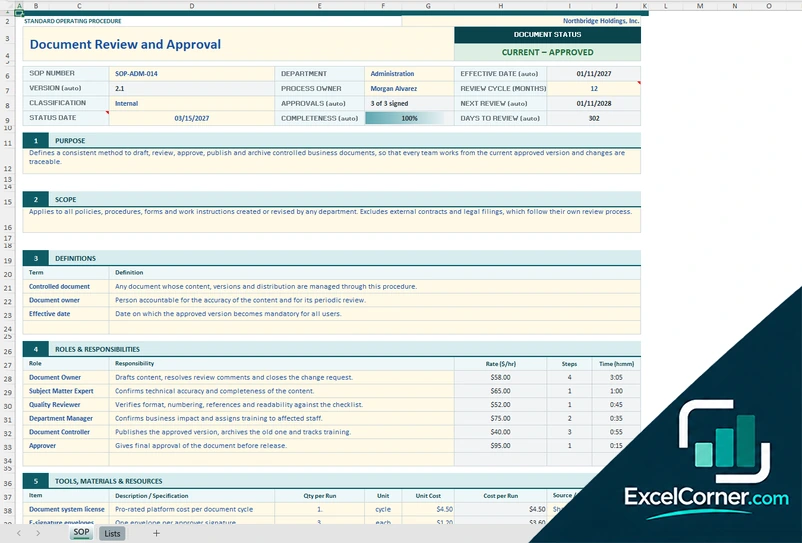
A complete SOP on one sheet, with an automatic version, next review date and completeness, roles with hourly rates, numbered steps with control points and the cost per execution.
SOPLists
.xlsx · 21 KB
Version 2
SOP Compliance Overview
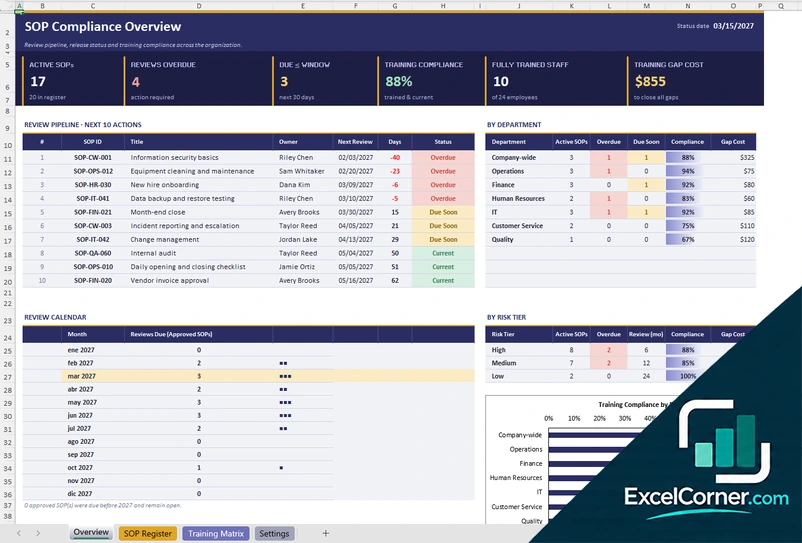
Register every SOP with its owner, risk tier and review dates, keep a training matrix by employee and see overdue reviews and training gaps on a dashboard.
OverviewSOP RegisterTraining MatrixSettings
.xlsx · 41 KB
Version 3
SOP with Run Checklist
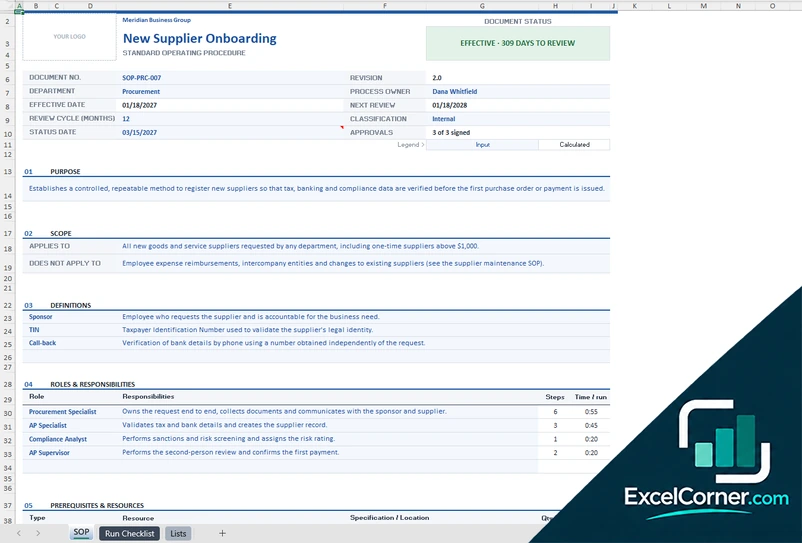
A procedure with action, decision, quality check and caution steps, a process summary with cost per run, and a checklist that you fill in each time the procedure is performed.
SOPRun ChecklistLists
.xlsx · 28 KB
What is inside the SOP Excel templates
Version 1: SOP Document
The SOP sheet is a standard operating procedure laid out in nine numbered sections. The header holds the SOP number, the department, the process owner, the effective date, the review cycle in months, the classification and the status date, and it calculates the version, the approvals, the next review date, the days to review, the completeness and a document status such as current and approved. The sections are the purpose, the scope, the definitions, the roles and responsibilities with an hourly rate, the number of steps and the time of each role, the tools, materials and resources with their cost for each run, and the procedure. The procedure lists each step with its stage, the instruction, the responsible role, the minutes, a control point type (standard, quality check, critical or approval), the evidence or record, the labor cost and the elapsed time. A cost section works out the time, the labor cost, the materials cost and the total cost of each execution and of a year, and a document health check tells you what is missing. The last sections are the revision history and the approvals. The Lists sheet holds the roles and their rates, the stages, the control point types, the classification levels and the review settings.
Version 2: SOP Compliance Overview
The Overview is a dashboard for the whole SOP library. Six cards show the active SOPs, the reviews overdue, the reviews due within the window you set, the training compliance, the fully trained staff and the training gap cost. A review pipeline lists the next ten actions with the SOP ID, the title, the owner, the next review date, the days left and a status, a table by department shows the active SOPs, the overdue and due-soon reviews, the compliance and the gap cost, and a review calendar counts the reviews due in each month. A table by risk tier and a chart of training compliance by department complete the page. The SOP Register has one row for each SOP with the ID, the title, the department, the owner, the risk tier, the document status, the version, the effective date, the date of the last review, the review cycle, the next review, the days left, the review status, the retraining cycle, the number of trainees required, the number trained and current, the compliance, the cost per trainee and the training gap cost. The Training Matrix lists each employee by department and job title against each SOP, with the date trained and a status of current, expiring, expired or pending. The Settings sheet holds the review and retraining cycle of each risk tier, the document statuses and the departments.
Version 3: SOP with Run Checklist
The SOP sheet has a space for your logo and the header of the document: the document number, the revision, the department, the process owner, the effective date, the next review, the review cycle, the classification, the status date and the approvals, with a document status. It continues with the purpose, the scope (what it applies to and what it does not), the definitions, the roles and responsibilities with the steps and the time for each run, and the prerequisites and resources with their cost for each run. The procedure lists numbered steps of five types: action, decision, quality check, caution and handoff, with the instruction, the responsible role, the expected result or record, the minutes and, for decisions, the step to go to if the answer is no. A process summary then shows the steps, the decisions, checks and cautions, the standard time, the labor cost and the resources of each run, the total cost, the annual hours and the annual cost for the number of runs per year, and the completeness of the document. The Run Checklist sheet is a form for each execution: the run date, the reference, who performed and who verified it, the team and the subject, with a step-by-step record of the instruction, the responsible role, the expected result, a done box, the actual minutes, the initials and a comment on any deviation, a summary of the steps completed, the deviations, the time against the standard and the cost of the run, and a sign-off block. The Lists sheet holds the roles and rates, the step types, the resource types and the settings.
How to use an SOP template in Excel
- Download
Pick the version you want and open it in Excel. The files have a sample procedure for a made-up company, so you can see how each sheet works. - Set up the lists
On the lists or settings sheet, enter your roles and their hourly rates, your departments, the review cycle and the other lists that feed the dropdowns. - Write or register the SOP
Fill in the header, the purpose, the scope and the steps of a procedure, or add each SOP of your library to the register with its owner, risk tier and dates. - Review and approve
Record the approvals and the review dates. The template shows the version, the next review date and how complete the document is. - Train and use it
Track who is trained on each SOP, or print the run checklist and fill it in every time the procedure is performed.
Replace the sample content with your own. The dates, the statuses, the costs and the charts update on their own.
Which SOP template do you need?
| SOP Document | SOP Compliance Overview | SOP with Run Checklist | |
|---|---|---|---|
| For | Writing one complete SOP | Managing a library of SOPs | Following a procedure step by step |
| Best for | Documenting a process | Quality, compliance and training teams | Teams that perform the same task often |
| Main outputs | Document status, version, next review, time and cost per execution, health check | Reviews overdue and due soon, training compliance, gap cost, review calendar | Process summary, steps completed, deviations, time against standard, cost of the run |
| Sheets | 2 | 4 | 3 |
| Charts | No | Yes | No |
They are separate files, so you can use more than one.
Tips for writing a good SOP
- Write for the person who does the task, in short steps that start with a verb.
- Give each SOP one owner and a review date, so that it does not go out of date.
- State the purpose and the scope first, so that readers know when the SOP applies.
- Mark the control points, such as checks, approvals and critical steps, and say what record each one leaves.
- Add the time and the cost of each step, which helps you to improve the process and to plan the work.
- Keep a revision history, with the version, the date and what changed.
- Test the SOP by asking someone who has not done the task to follow it.
Frequently asked questions
Are these SOP templates for Excel free?
Yes. All three versions are free to download as .xlsx files. You do not need an account or an email address.
Which version should I choose?
Choose the SOP Document (Version 1) to write one complete procedure with roles, steps, control points and a revision history. Choose the SOP Compliance Overview (Version 2) to manage many SOPs, their review dates and the training of your staff. Choose the SOP with Run Checklist (Version 3) if you want a decision-based procedure and a checklist to record each time that it is performed.
What is an SOP?
An SOP, or standard operating procedure, is a written document that explains how to carry out a routine task step by step, so that the result is consistent and safe regardless of who does it.
What should an SOP include?
An SOP usually includes the title and number, the purpose, the scope, the definitions, the roles and responsibilities, the materials and tools needed, the procedure steps, the records that the steps produce, the revision history and the approvals. The first template contains all of these.
How do I write an SOP in Excel?
Use one sheet for one procedure, with a section for each part: header, purpose, scope, roles, resources and a table of numbered steps. The templates give you that layout with formulas for the version, the next review date, the time and the cost, so you only type the content.
How do I keep track of SOP reviews and training?
Use a register with one row for each SOP, its owner, its review cycle and its last review date, and a matrix of employees against SOPs with the date each person was trained. Version 2 does both and shows what is overdue.
Can I print the SOP or save it as a PDF?
Yes. The SOP sheets have a print layout, so you can print them or save them as a PDF to share with your team.
Does the template work in Google Sheets?
The files are made for Microsoft Excel and use standard formulas with no macros. You can upload them to Google Drive and open them with Google Sheets, but some formatting or charts may look different.
Is my information stored online?
No. The templates are plain Excel files, so the names, addresses, dates and amounts you type stay in your own file on your own computer.
These templates are documentation tools with made-up sample content. Review every SOP with the people who do the work and with your quality, safety and legal teams before you rely on it. Excel is a trademark of Microsoft Corporation; Excel Corner is not affiliated with Microsoft.