
Home › Operations, Inventory & Logistics › Compare Prices Excel Template
Previewing: Version 1 · Vendor Price Comparison with Landed Cost. Pick another version on the right.
Instant download · No sign-up · No email
Download these free compare prices templates in Excel to find the best deal. One compares vendors with the true landed cost. One compares a shopping list across five stores and analyzes deals. One compares offers with payment plans and the cost of ownership.
Choose your version
- File
- .xlsx · 22 KB · 2 sheets
- Works with
- Microsoft Excel (.xlsx)
- Macros
- None · formulas only
- Price
- Free
Compare prices in an Excel spreadsheet
The lowest price is not always the best deal. Shipping, taxes, discounts, pack sizes and payment plans change what you really pay. In Excel you enter each quote once, and the template works out the true cost, marks the cheapest option and shows how much you save, so you can decide with numbers.
These three templates compare in different ways. Version 1 compares vendors on a basket of items with the landed cost and a split-order option. Version 2 compares a shopping list across five stores and has a deal analyzer. Version 3 compares offers on the purchase price, the payment plan and the cost of ownership.
Best for
- Buyers who compare vendor quotes for the same list of items
- Households and offices that want to find the cheapest store for a list
- Anyone who compares offers with a payment plan or running costs
Maybe not for
A price tracking site or browser extension that watches prices online. These are Excel files: you type the prices you get, and the comparison is calculated from them.
Which version is right for you?
All three are free, formula-driven Excel files with sample data you can replace. They are independent, so you can download more than one.
Version 1
Vendor Price Comparison with Landed Cost
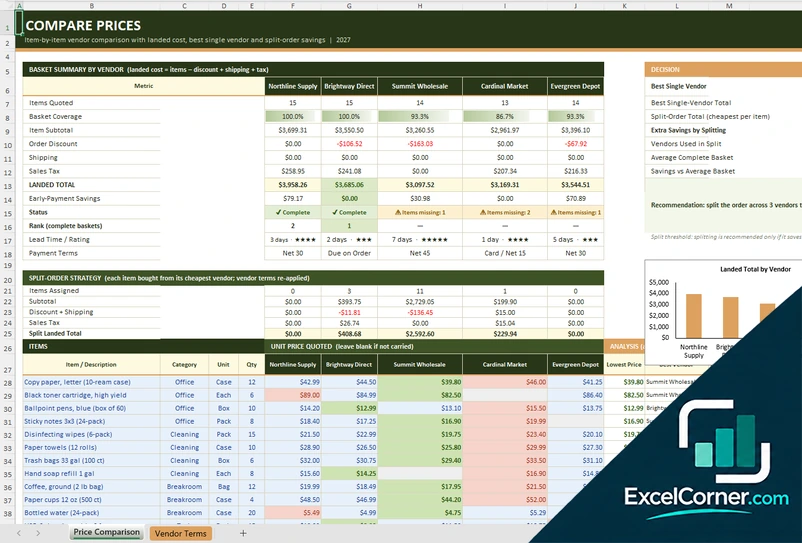
A price comparison with landed cost for five vendors, a split-order strategy that buys each item from the cheapest vendor, a vendor terms sheet and a chart.
Price ComparisonVendor Terms
.xlsx · 22 KB
Version 2
Store Comparison with Deal Analyzer
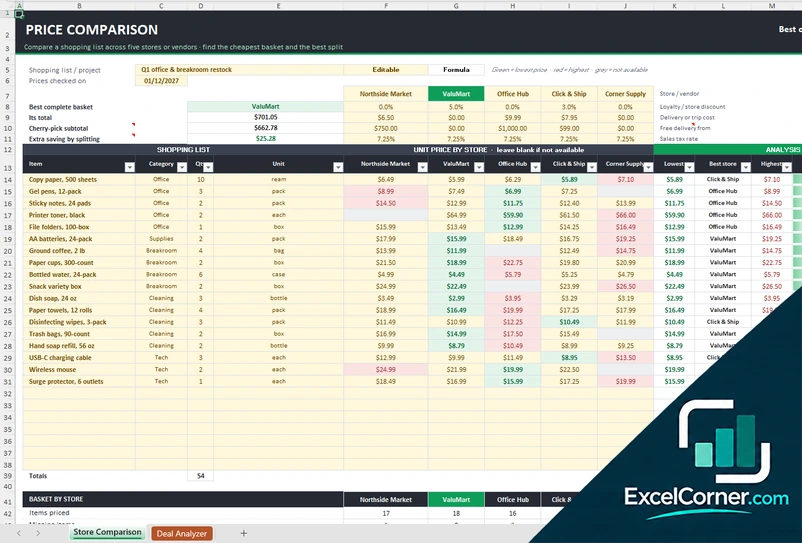
A store price comparison for a shopping list with the cheapest basket and best split, plus a deal analyzer that finds the true unit cost of four offers.
Store ComparisonDeal Analyzer
.xlsx · 25 KB
Version 3
Offer Comparison with Payment Plan and Total Cost
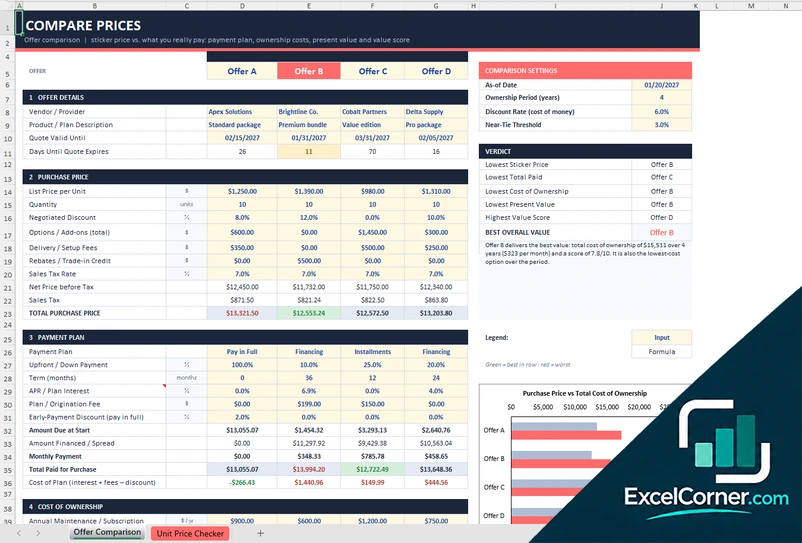
An offer comparison with purchase price, payment plans, ownership costs, present value and a value score, plus a unit price checker for different package sizes.
Offer ComparisonUnit Price Checker
.xlsx · 24 KB
What is inside the compare prices templates
Version 1: Vendor Price Comparison with Landed Cost
On the Price Comparison sheet you list the items with a category, a unit and a quantity, and enter the price from each of five vendors. It builds a basket summary with the subtotal, the order discount, the shipping, the sales tax and the landed total, and ranks the vendors by complete baskets.
A split-order strategy buys each item from the cheapest vendor and applies each vendor’s terms again. A decision box shows the best single vendor and the saving, with a chart. The Vendor Terms sheet holds the shipping, discounts, tax, minimums and payment terms.
Version 2: Store Comparison with Deal Analyzer
On the Store Comparison sheet you enter a shopping list and the price at each of five stores, with the loyalty discount, the delivery cost and the sales tax. Green marks the lowest price and red the highest.
It shows the best complete basket, the total of picking the cheapest store for each item and the extra saving from splitting. The Deal Analyzer compares four offers with different pack sizes, units, fees and payment plans on a true unit cost, with a weighted score and a verdict.
Version 3: Offer Comparison with Payment Plan and Total Cost
On the Offer Comparison sheet you enter four offers with the vendor, the list price, the quantity, the discount, the options, the delivery, the rebates and the tax. You add the payment plan with the term, the interest rate and the fees, and the cost of ownership over several years.
The verdict shows the lowest price, the lowest total paid, the lowest cost of ownership, the best present value and the best value score, with a chart. The Unit Price Checker converts different package sizes to a standard unit.
How to use a compare prices template in Excel
- Download
Pick the version that fits your comparison and open it in Excel. Each file has sample quotes. - List the items
Add each item with its quantity and unit, or each offer with its details. - Enter the prices
Type the price from each vendor or store. Leave a cell blank if an item is not available. - Add the terms
Enter the shipping, the discounts, the taxes and the payment plan for each option. - Read the result
Check the cheapest option, the true total and the saving, and choose.
Replace the sample prices with your own. The totals, the ranks and the savings update on their own.
Which price comparison template do you need?
| Vendor Price Comparison | Store Comparison and Deal Analyzer | Offer Comparison | |
|---|---|---|---|
| You enter | Items, quantities and vendor prices | A shopping list and store prices | Four offers with payment plans |
| Best for | Buying a basket from vendors | Shopping lists and different pack sizes | Big purchases with financing |
| You get | Landed cost, best vendor, split-order saving | Cheapest basket, unit price, verdict | Total paid, cost of ownership, value score |
| Sheets | 2 | 2 | 2 |
| Charts | 1 | No | 1 |
They are separate files, so you can use more than one.
Tips for comparing prices
- Compare the same item, the same quantity and the same unit.
- Add shipping, taxes and fees. They can change which option is cheapest.
- Convert different pack sizes to a price per unit.
- For big purchases, include the running costs over the years you will own it.
- Check that the quotes are still valid.
Frequently asked questions
Are these compare prices templates free?
Yes. All three versions are free to download as .xlsx files. You do not need an account or an email address.
Which version should I choose?
Choose the Vendor Price Comparison (Version 1) to compare quotes for a basket of items. Choose the Store Comparison (Version 2) for a shopping list and different pack sizes. Choose the Offer Comparison (Version 3) for a big purchase with a payment plan.
How do I compare prices in Excel?
Put the items in rows and the vendors in columns, enter each price, and add the shipping and the tax. Then add a row for the total of each vendor and mark the lowest one. The templates do this and show the saving.
What is landed cost?
Landed cost is the total you pay for an item or a basket: the price, minus the discounts, plus the shipping and the taxes. Version 1 uses it to rank the vendors, so you compare what you really pay.
How do I compare different pack sizes?
Convert every price to the same unit, such as price per pound or per fluid ounce. Version 2 and Version 3 have a unit price checker that does the conversion, so you compare like with like.
More free pricing and cost templates
These templates use made-up sample prices, vendors and offers. Replace them with the real quotes you get, and check the terms and the taxes before you decide. Excel is a trademark of Microsoft Corporation; Excel Corner is not affiliated with Microsoft.